Repeat clicks
Same device different IP ad fraud: what it means and how to check
Same device different IP ad fraud: why one device shows many IP addresses, when it points to VPN hopping or click farms, and how to check your paid visits.
- By
- Adjira team
- Published
- Reading time
- 7 min read
Same device different IP ad fraud is the pattern where one device clicks your ads again and again, but each click arrives from a new IP address. To an IP based report, it looks like several unrelated visitors. To your budget, it is one visitor paying you nothing while you pay for every click.
Not every device with changing IP addresses is fraud, though. Phones change address all the time on their own. This guide explains the innocent reasons, the patterns that are worth acting on, how to check your own paid traffic, and what you can and cannot do about it in the ad platforms.
Why one device shows up with many IP addresses
An IP address describes where traffic leaves for the internet, not who is sending it. Several ordinary things change it:
- Mobile networks. Carriers move phones between addresses as they travel between cell sites, and many carriers put large numbers of customers behind shared addresses. A phone can show several addresses in a day without its owner doing anything.
- Wi-Fi and mobile data. A phone that moves from home Wi-Fi to mobile data, then to office Wi-Fi, shows three addresses and three network operators.
- Home routers. Some broadband providers assign a new address when the router restarts.
- Privacy features. Some browsers and operating systems route traffic through relays that hide the real address.
And several deliberate things change it:
- VPN hopping. Someone who wants each click to look new switches VPN server between clicks. Each server has a different address, often in a different country.
- Proxies. Public and residential proxy services let one machine send traffic through many addresses. Residential proxies are especially hard to spot because the addresses belong to ordinary home connections.
- Click farms and device racks. Groups of devices, or many browser profiles on one machine, cycle through proxy addresses so that a small number of devices can produce a large number of clicks.
The first list explains most changing addresses. The second list is what you are looking for.
When same device different IP ad fraud is likely
The address change itself is weak evidence. What matters is what comes with it. Look for combinations like these:
| Pattern | Innocent explanation | When it points to fraud |
|---|---|---|
| Two or three addresses in a day, same mobile carrier | Normal phone movement | Rarely |
| Addresses from several countries within an hour | Travel is impossible at that speed | Usually VPN or proxy hopping |
| Addresses from hosting providers | People rarely browse from servers | Often automation or a VPN |
| Many paid clicks on one expensive keyword | Comparison shopping over days | Many clicks in hours, no engagement |
| Browser time zone fixed while addresses move | Traveler with an unchanged clock | Time zone far from every address |
A device that clicks the same costly keyword eight times in an afternoon through four countries, never scrolls and never converts, is a strong candidate. A phone that shows two carrier addresses and buys something is a customer.
How to check for same device different IP ad fraud
You need visit level data from your own website, because ad platforms do not show you the device or network behind each click.
1. Tie each visit to a paid click
Keep the full landing URL, including the click identifier each platform adds: gclid for Google Ads, msclkid for Microsoft Advertising, fbclid for Meta and ttclid for TikTok. Without it, you cannot connect a suspicious visit to the click you paid for.
2. Record a small set of device details
For each paid visit, store a few characteristics the browser exposes: operating system and version, browser and version, screen size and pixel density, language, and time zone. Check your consent requirements first and collect only what you need.
3. Record the network
Store the IP address and look up the network operator and its autonomous system number. Note whether the operator is a mobile carrier, a broadband provider or a hosting company.
4. Group by device, then count addresses
Group paid visits by the combination of device details. For each group, count distinct IP addresses, countries and network operators, and the paid clicks in a short window such as a day. Sort by the most addresses per device.
5. Discount common devices
Popular phones share the same screen size, operating system and language. A match on a common phone with nothing else in common is weak. Weight matches higher when the details are less common, such as an unusual screen size, browser version or language setting.
6. Check behavior and outcomes
For the top groups, look at what happened after the click. Real visitors scroll, read and convert sometimes. Repeat clickers rarely do anything at all.
This is the same method our guide on the same person clicking ads from different devices uses, applied the other way round: one device, many networks, rather than one person, many devices.
Device fingerprint click fraud checks have limits
Linking visits by device characteristics is useful, and it is not perfect.
- False matches. Identical phones with default settings look alike. That is why you combine device details with timing, network and behavior.
- Missed matches. Someone who changes browser, clears settings or uses a different device each time breaks the link.
- Privacy. Device details can be personal data in some places. Collect only what you need for fraud checks, follow your consent requirements and keep the data inside your own systems.
Treat a device match as a lead for review, never as an identification of a person.
What you can do about it in the ad platforms
The ad platforms already filter some of this. Google, for example, counts clicks from automated tools and manual clicks meant to raise your costs as invalid clicks and does not charge for the ones it filters (Google Ads Help: Invalid clicks). What gets through is the reason you are checking.
Your options once you find a pattern:
- Exclude the specific addresses you saw. Google Ads allows up to 500 excluded IP addresses per campaign, campaign level IP exclusions are not available for Performance Max and some other campaign types, and account level exclusions are also supported (Google Ads Help: Exclude IP addresses). Because the pattern is defined by changing addresses, exclusions alone will not stop it, but they raise the cost of repeating it.
- Change what attracts it. If the device always clicks the same keyword, consider match types, bids or the ad schedule for that keyword.
- Tighten location settings. If the addresses come from countries you do not target, check that location targeting reaches people in your markets.
- Report it. Google accepts investigation requests through its Click Quality Form for activity in the last 60 days (Google Ads Help: Managing invalid traffic). Our guide to the Google Ads invalid activity credit report explains what to include.
How Adjira links visits by device
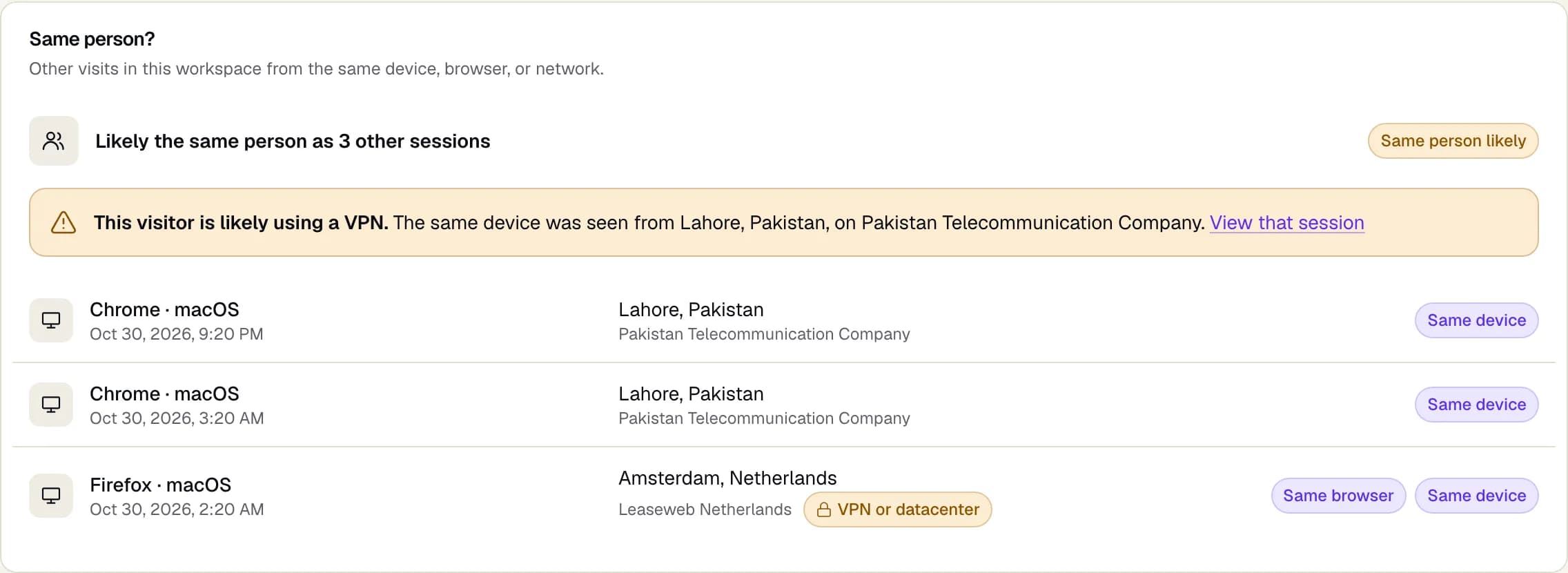
Adjira does the grouping above on every paid visit, inside your workspace.
- Same person detection matches visits on the same device, the same browser and the same network, and warns that a visitor is likely using a VPN when the same device appears from a different country or network operator.
- Network checks name the network operator for every visit and flag VPN, datacenter, Tor, public proxy, residential proxy and anonymizer traffic, plus time zone mismatches.
- The fraud risk score weighs linked visits with the other signals and labels each one as detected, inferred or unknown.
- Protection rules can alert your team or propose an exclusion when a pattern repeats. Exclusions for Google Ads and Microsoft Advertising are written only after a person confirms each change.
If the addresses behind a device are mostly VPN servers, our guide to whether VPN clicks are fake helps decide how much weight to give them.
Frequently asked questions
Is the same device with different IP addresses always ad fraud?
No. Phones change IP address as they move between cell sites and Wi-Fi networks, and many carriers share addresses between customers. It becomes suspicious when the addresses come from several countries or hosting providers in a short time, with repeated paid clicks and no engagement.
How can a device be recognised when its IP address changes?
The browser describes the device the same way on each visit: operating system, browser version, screen, language and time zone. When these match closely across visits, the visits probably came from one device, even through different networks.
Can IP exclusions stop a device that keeps changing IP address?
Only partly. Excluding the addresses you saw raises the cost of repeating the pattern, but a device that changes address for every click will arrive from new ones. Exclusion limits, such as 500 IP addresses per Google Ads campaign, also run out quickly.
Do click farms use different IP addresses?
Organised click activity often cycles devices or browser profiles through proxy addresses so that each click looks like a new visitor. Device characteristics, timing and the lack of engagement after the click are usually more revealing than the addresses.
Is it legal to link visits by device details?
It depends on where your visitors are and how you collect and use the data. Collect only what fraud checks need, follow your consent requirements, and keep the data inside your own account. Adjira's tracker can wait for consent and follows the choice your site passes to it.