Skip to content

Click fraud detection, explained

Click fraud detection features that show their work.

Fraud risk and visitor quality on every paid visit, the same person across devices and VPNs, wasted spend per platform, and rules that act only when you say so.

  • Over 100 signals on every paid visit
  • Read-only ad connections
  • No change without your confirmation
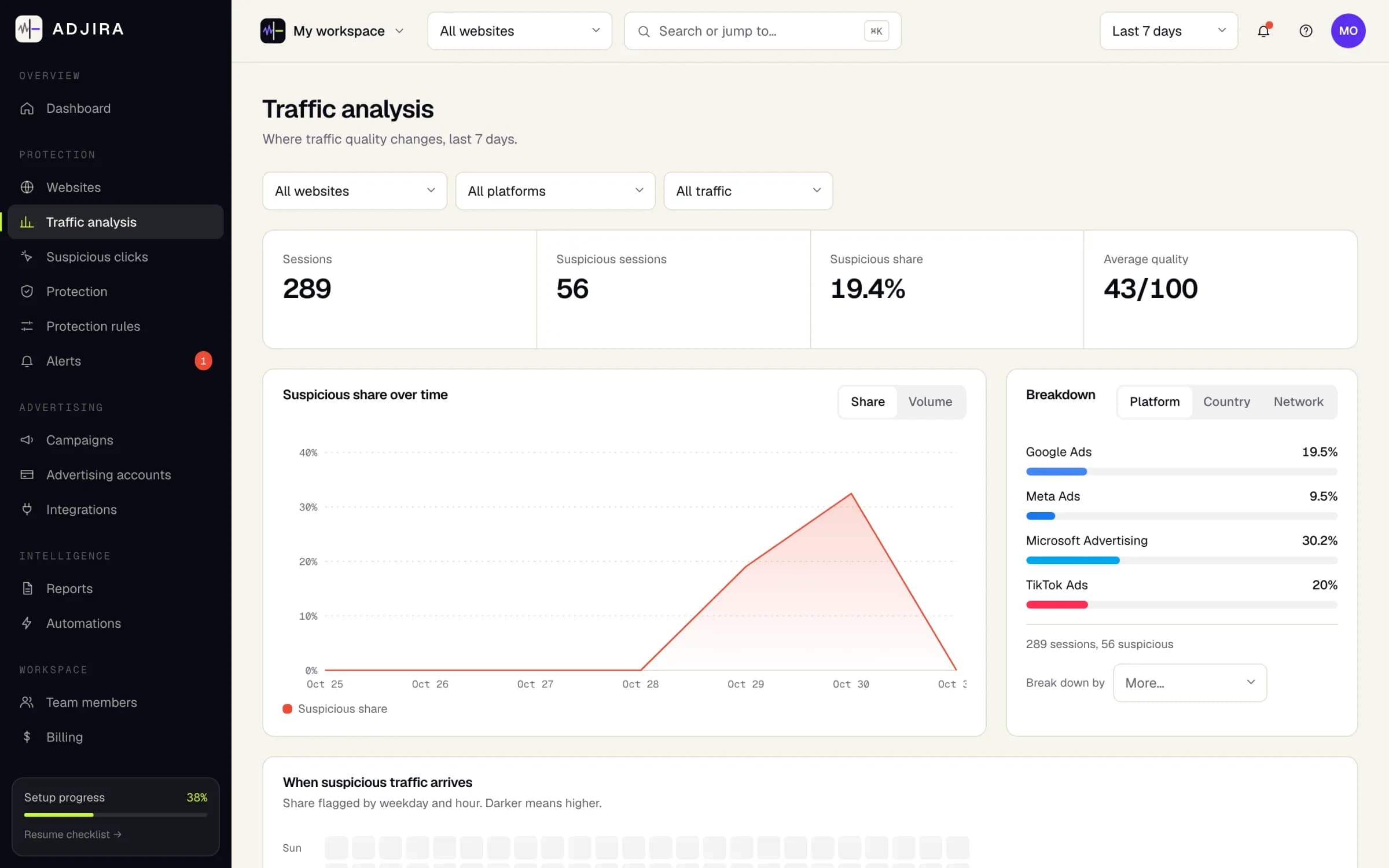
The Traffic analysis page in Adjira: sessions, suspicious sessions, suspicious share and average quality for the last 7 days, a suspicious share chart, and a breakdown by ad platform.
Example dataScreenshot from an example workspace.
signals checked on every paid visit
100+
signal families, from network to journey
9
ad platforms in one view
4
network checks on every visit
8

Detect

Invalid traffic detection that shows its evidence

Every paid visit is scored for fraud risk from network, browser, automation, behavior and history signals. You see why, not just a number.

Fraud risk scoring with evidence

A flag you cannot explain is a flag you cannot act on.

Every paid visit gets a fraud risk score built from over 100 signals in nine families: network, browser, automation, behavior, journey, visit history, ad click data, website baselines and clusters. Each score lists the signals behind it, labeled as detected, inferred or unknown.

Bot traffic detection for ads starts with automation signals, such as a browser that reports automation control, then weighs behavior on the page and the journey after the click against your website’s own baselines. A score is evidence for a person to review, not proof of fraud.

What you get

  • Risk bands from normal to very high on every session
  • Correlated suspicious visits grouped into clusters
  • Mark sessions reviewed, add notes and export the evidence
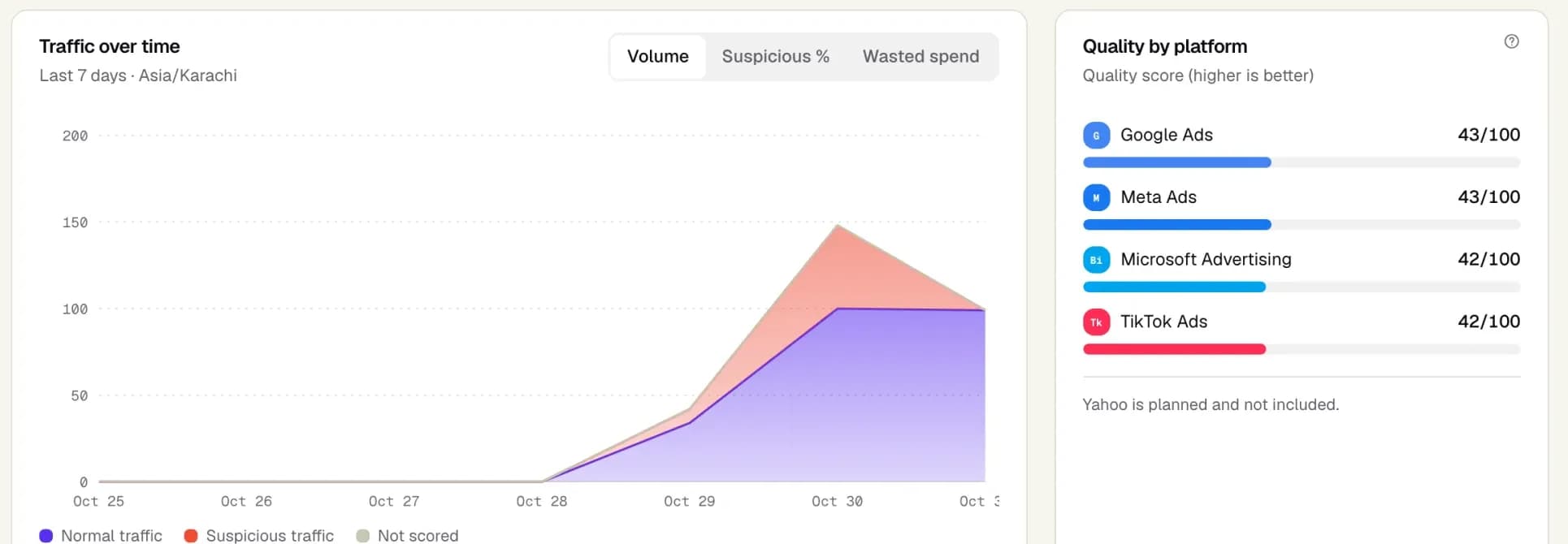
The overview dashboard in Adjira: normal and suspicious paid traffic over 7 days, and a traffic quality score out of 100 for Google Ads, Meta Ads, Microsoft Advertising and TikTok Ads.
Example dataScreenshot from an example workspace.

Same person across devices and VPNs

Repeat clickers switch devices and networks so every click looks new.

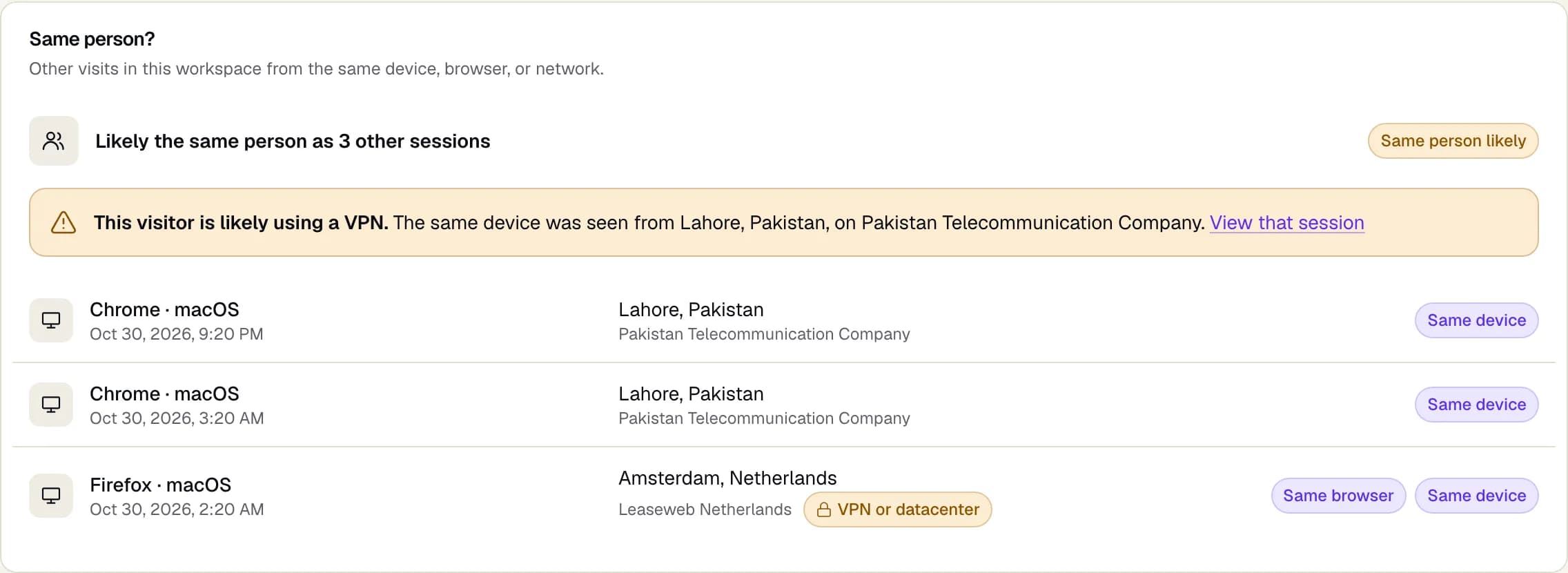
Adjira links visits in your workspace that share a device, a browser or a home or office network. When the same device shows up from a different country or network operator, the session warns that the visitor is likely using a VPN and links to the other visit.

This matters because repeat clicks are easy to hide one at a time. Seen together, three visits from one device through two countries tell a clearer story than any single session, and every link stays inside your own workspace.

What you get

  • Same device, same browser and same network matches
  • A likely VPN warning with the place and network it came from
  • One click to every linked session
The Same person? panel on a session: the visitor is likely the same person as 3 other sessions, a warning that they are likely using a VPN, and each linked visit marked Same device or Same browser.
Example dataScreenshot from an example workspace.

VPN, proxy and datacenter traffic detection

Traffic from hosting networks and anonymizers hides where it really comes from.

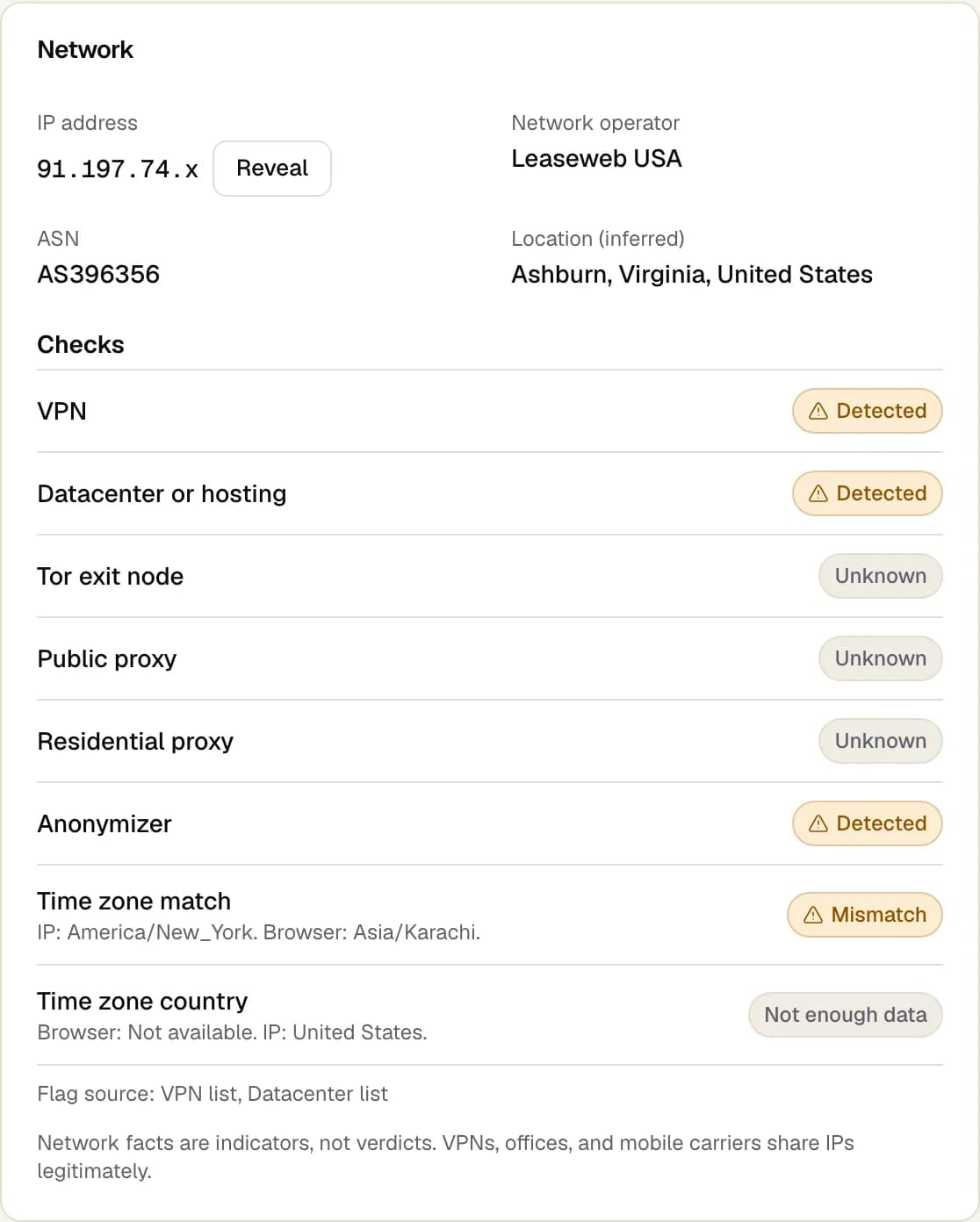
Each session runs eight network checks: VPN, datacenter or hosting, Tor exit node, public proxy, residential proxy, anonymizer, time zone match and time zone country. Results read in plain English, and network facts are treated as indicators, never as verdicts on their own.

VPN and datacenter click detection matters because most real shoppers browse from home, office or mobile networks. A click from a hosting provider whose browser time zone sits on another continent deserves a second look, and the checks show exactly which facts raised it.

What you get

  • Browser time zone compared with the IP address location
  • Network operator and ASN for every visit
  • IP addresses masked by default, revealed on request
Network checks on a session: masked IP address, network operator, ASN and inferred location, then VPN, datacenter, Tor, public proxy, residential proxy, anonymizer and time zone checks, each marked Detected, Unknown or Mismatch.
Example dataScreenshot from an example workspace.

Measure

Wasted spend, visitor quality and every platform in one view

Know what suspicious clicks cost, which campaigns attract real visitors, and how Google Ads, Meta, Microsoft and TikTok compare.

Wasted ad spend per platform

Click volume says nothing about how much of the budget reached real people.

Adjira joins scored sessions with cost data from each connected ad account to estimate the spend on suspicious clicks, per platform and per campaign. The figure is always labeled as an estimate, so it is never confused with a refund or a verified saving.

It answers the question budget owners ask first: how much is going to clicks that never had a chance to convert, and which platform to review first.

  • Estimated suspicious spend on the overview dashboard
  • Breakdown by Google Ads, Meta, Microsoft and TikTok
  • Campaigns ranked by suspicious share
Wasted ad spend per platformExample data
PlatformSuspicious shareEst. suspicious spend
Google Ads14%$412
Microsoft Advertising22%$188
Meta Ads9%$96
TikTok Ads18%$73

Estimate: suspicious paid clicks multiplied by each account’s cost per click.

Visitor quality score

Not every low-value visit is fraud, and not every real visitor is valuable.

Alongside fraud risk, every session gets a visitor quality score from engagement and the valuable actions you define, such as a sign up or a purchase. Low quality and high risk are kept apart, so a weak campaign is not mistaken for an attack.

That separation keeps decisions honest: a low quality campaign needs better targeting or creative, while high risk traffic needs review and, once confirmed, an exclusion.

  • Quality bands from low to high
  • Valuable actions you choose per website
  • Baselines learned from your own traffic
Visitor quality scoreExample data
  • Low12%
  • Fair24%
  • Good41%
  • High23%

Share of paid sessions in each quality band.

Campaign and platform comparison

Four dashboards, four definitions of a click.

Connect each ad account read-only and Adjira attributes sessions to platforms and campaigns from click identifiers. Compare traffic quality across networks in one view and spot the campaign where it drops.

Every scored session is tied back to the platform and campaign that paid for it, so Google Ads click fraud and a weak TikTok campaign are never lumped together.

  • Google Ads, Meta Ads, Microsoft Advertising and TikTok Ads
  • Campaign pages with risk, quality and spend side by side
  • Unusual changes flagged against each campaign’s baseline
See integrations
Campaign and platform comparisonExample data
  • Google Ads91 / 100
  • Microsoft Advertising88 / 100
  • Meta Ads84 / 100
  • TikTok Ads79 / 100

Teams and agency client workspaces

Every client needs separate access, data and reporting.

Invite your team with owner, administrator, analyst and viewer roles. Agencies can add a separate client workspace for every account they manage, each with its own websites, connections and reports.

Each workspace keeps its own sessions, scores and reports, so an agency can show every client the evidence for its own account without exposing anyone else’s.

  • Four roles with clear permissions
  • A workspace per client, switchable from one login
  • Two-step sign in with an authenticator app
Adjira for agencies
Teams and agency client workspacesExample data
  • NO

    Northwind Outdoor

    3 websites · Google Ads, Meta

    Owner
  • HD

    Harbor Dental Group

    1 website · Microsoft Advertising

    Analyst
  • LF

    Lumen Fitness

    2 websites · Meta, TikTok

    Administrator
  • OF

    Oakline Furniture

    1 website · Google Ads

    Viewer

Roles

  • Owner
  • Administrator
  • Analyst
  • Viewer
Network checks
  • VPNDetected
  • Datacenter or hostingDetected
  • Tor exit nodeNot detected
  • Time zone matchMismatch
Eight checks on every visit, written in plain English.
Linked visits
  • Chrome · macOSSame device
  • Firefox · macOSSame browser
  • Safari · iOSSame network
Visits linked when they share a device, a browser or a network.
Every finding is labeled
  • Hosting networkDetected
  • Repeat visitsInferred
  • Browser time zoneUnknown
Detected, inferred or unknown, so nobody mistakes a guess for a fact.

Works with every major ad platform

Act

Click fraud protection software that acts only when you say so

Turn findings into rules, alerts and reviewed exclusion lists. Adjira starts in monitor mode and never changes an ad account on its own.

Protection rules and reviewed exclusions

Manual review does not scale past a few campaigns.

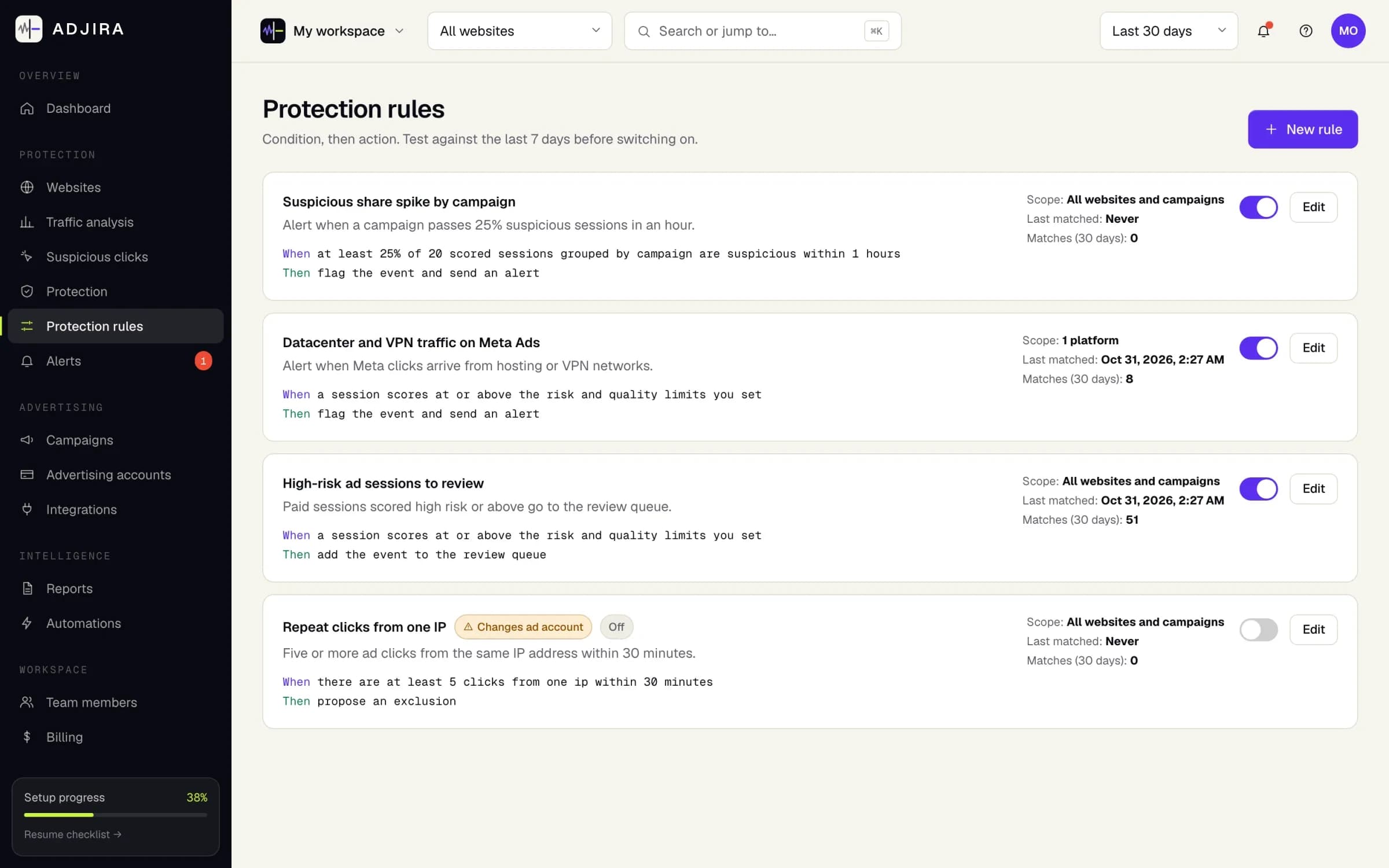
Write rules as a condition and an action: alert the team, queue a review, or propose an exclusion. Test a rule against the last 7 days before switching it on. Exclusion lists for Google Ads are applied only after you grant write access and a person confirms each change; for Microsoft Advertising, Adjira prepares the reviewed list for you to paste.

Rules turn what you learn in review into something repeatable, such as alerting the team when a campaign passes a suspicious share, or proposing an exclusion when one IP address clicks five times in half an hour.

What you get

  • Three protection modes: monitor only, alert and review, provider actions
  • Rules tested against past traffic first
  • No change to an ad account without confirmation
Protection rules in Adjira, each written as When and Then: a suspicious share spike alert, a datacenter and VPN alert for Meta Ads, a review queue for high-risk sessions, and a switched off rule that proposes an exclusion.
Example dataScreenshot from an example workspace.

Alerts, reports and digests

Bad traffic is cheapest to stop on the day it starts.

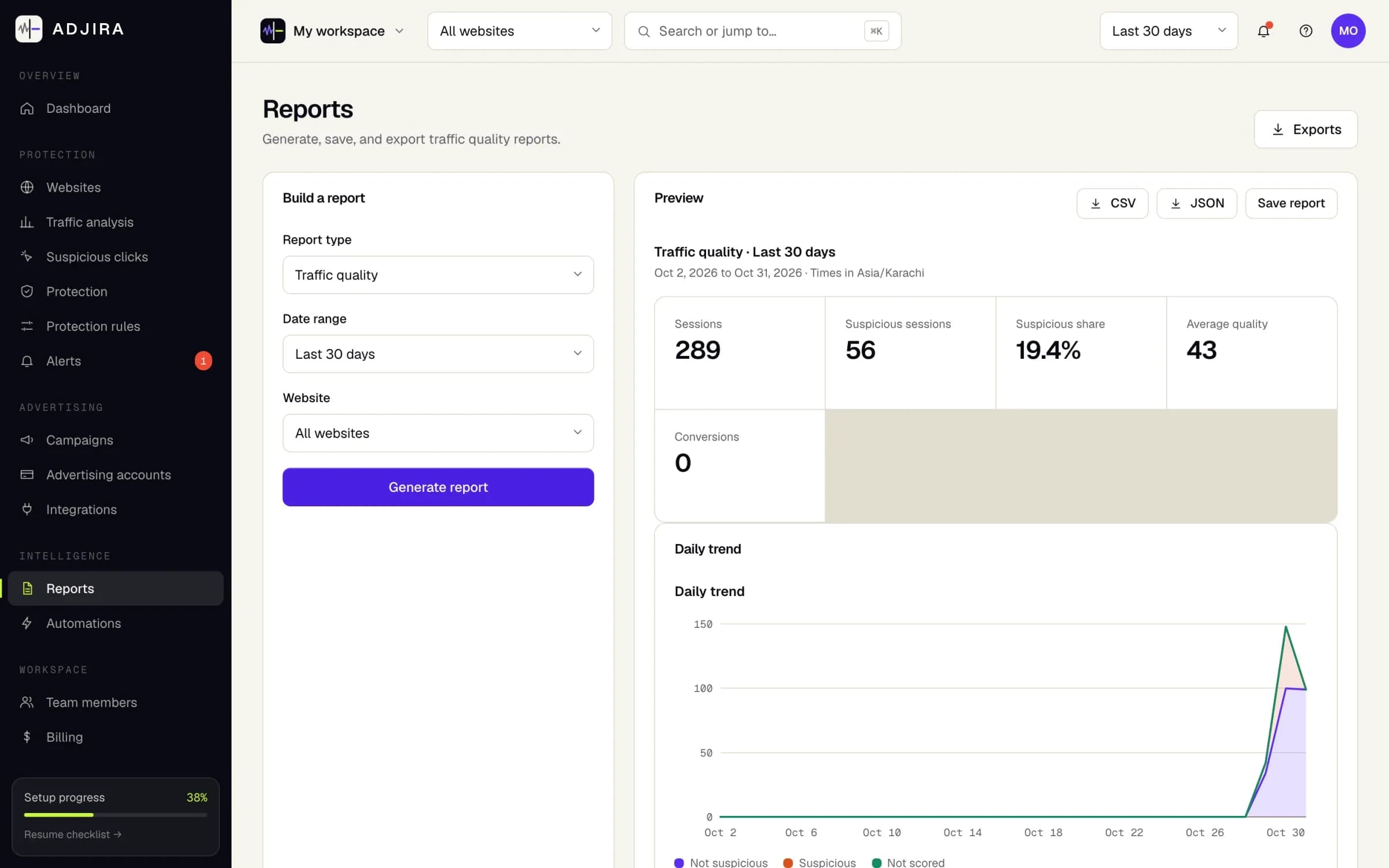
Alerts arrive by email and in the app when suspicious spend spikes, a campaign passes its suspicious traffic threshold, a cluster of high risk traffic appears, or tracking stops on a website. Scheduled reports and weekly digests keep stakeholders informed.

Every alert links straight to the sessions behind it, so the person who receives it can check the evidence before anyone changes a campaign.

What you get

  • Choose how you hear about each kind of alert
  • Scheduled reports and weekly email digests
  • Export sessions, events, scores and clusters as CSV or JSON
The Reports page in Adjira: a traffic quality report for the last 30 days with sessions, suspicious sessions, suspicious share and average quality, CSV and JSON export, and a daily trend chart.
Example dataScreenshot from an example workspace.

Before and after

What changes when you can see every paid visit

Ad platforms see the click. Adjira adds what happened on your website after it, so decisions rest on evidence instead of guesses.

Without Adjira

  • Each ad platform reports clicks with its own definitions.
  • A suspicious click is a hunch you cannot explain to a client.
  • A repeat clicker on a new device or VPN looks like a new visitor.
  • Budget lost to bad traffic is a guess.
  • Exclusions are added by hand, one account at a time.

With Adjira

  • One view of traffic quality across Google Ads, Meta, Microsoft and TikTok.
  • Every risk score lists the signals behind it, labeled detected, inferred or unknown.
  • Visits from the same device, browser or network are linked, with a likely VPN warning.
  • An estimate of suspicious spend per platform and campaign, clearly labeled as an estimate.
  • Rules propose exclusions, and a person confirms each one before it is written.

FAQ

Click fraud detection features: questions and answers

Still deciding?

Compare plans and limits, read how a paid visit moves from the first script tag to a confirmed exclusion, or browse the blog for guides on invalid traffic.

What do Adjira’s click fraud detection features include?

A fraud risk score and a visitor quality score on every paid visit, the same person detected across devices and VPNs, eight network checks for VPN, datacenter, Tor and proxy traffic, an estimate of wasted spend per platform and campaign, protection rules, alerts, scheduled reports, and separate workspaces for agency clients.

How does Adjira detect bot traffic from ads?

Each paid session is checked against over 100 signals in nine families, including automation signals such as a browser that reports automation control, behavior on the page, the journey after the click, and network facts. Each finding is labeled as detected, inferred or unknown, and the risk score is evidence for a person to review, not proof of fraud.

Can Adjira detect Google Ads click fraud?

Yes. Connect Google Ads read-only and Adjira ties each paid visit to its campaign through the click identifier, scores it, and estimates the suspicious spend per campaign. When you grant write access, reviewed exclusion lists can be sent to Google Ads after a person confirms each change. Adjira for Google Ads

How does VPN and datacenter click detection work?

Every session runs eight network checks: VPN, datacenter or hosting, Tor exit node, public proxy, residential proxy, anonymizer, time zone match and time zone country. The browser time zone is compared with the IP address location. Network facts are treated as indicators, because offices and mobile carriers share addresses legitimately.

Does Adjira block fraudulent clicks on its own?

No. Adjira starts in monitor mode. Protection rules can alert your team, queue a session for review or propose an exclusion, and nothing is written to an ad account until a person confirms it. Exclusion lists are supported for Google Ads and Microsoft Advertising.

How long does it take to see results?

Add your website, paste one script tag or load it through your tag manager, and connect your ad accounts read-only. Scored sessions appear as soon as paid traffic lands on your site. See how it works

Which features are included in each plan?

Plans differ in their limits and included features, and every plan starts with a free trial. The pricing page lists what each plan includes and the current price. Compare plans

Make every ad dollar count.

Install in minutes, connect your ad accounts read-only, and see your first scored sessions as soon as paid traffic lands.