Google Ads
How to detect VPN clicks on Google Ads, step by step
How to detect VPN clicks on Google Ads: what Google filters, checks you can run yourself, when a VPN click matters and how to act without blocking real buyers.
- By
- Adjira team
- Published
- Reading time
- 8 min read
If you want to know how to detect VPN clicks on Google Ads, start with an uncomfortable fact: Google Ads does not show you the network a click came from. The click report tells you the keyword, the device type and a rough location. It does not tell you that the visitor sat behind a commercial VPN, a hosting provider or a proxy. To see that, you need to look at the visit on your own website, after the click.
This guide covers what Google already filters, the checks you can run with the tools you have, how to tell an ordinary VPN user from a pattern worth acting on, and what to do once you find one.
What Google already does with invalid clicks
Google defines invalid clicks as "clicks on your ads that don't represent a genuine interest in your business", and lists accidental clicks, clicks from automated tools and bots, and manual clicks meant to raise your costs as examples (Google Ads Help: Invalid clicks). You are not charged for clicks its systems filter, and when it finds invalid traffic after a billing cycle has closed, it issues a credit on a later invoice (Google Ads Help: Managing invalid traffic).
So the question is not whether Google filters anything. It does. The question is what gets through. Google judges a click with the data it has at the moment of the click. It does not see what the visitor did on your page, whether the same device came back ten minutes later through another country, or whether every lead from one campaign arrived from the same hosting network.
You can see how much Google has already filtered by adding the Invalid clicks column: open Campaigns, select the columns icon, search for "Invalid clicks" and apply it. A high invalid click rate on one campaign is a good place to start looking.
Is VPN traffic click fraud?
Not by itself. Plenty of genuine people use a VPN every day: remote workers on a company VPN, privacy minded shoppers, people on hotel or airport Wi-Fi, and anyone whose browser ships with a built in privacy relay. If you blocked every VPN address, you would turn away some of your best customers.
A VPN click matters when it comes with other evidence. The patterns that deserve a second look are:
- The browser's time zone does not match the IP address location, for example a browser set to Asia with an IP address in Ohio.
- The same device appears again from a different country or network operator within a short time.
- Several paid clicks in a row come from one hosting provider rather than a home, office or mobile network.
- The visit has no real interaction: no scrolling, no clicks, a bounce within a second or two.
- The click lands on an expensive keyword and the same pattern repeats on the same keyword.
One of these alone is a lead. Two or three together are a pattern. Our guide to whether VPN clicks are fake goes deeper on when a VPN click matters.
How to detect VPN clicks on Google Ads yourself
You can do a basic version of this check without any extra tool, as long as your site keeps server logs or you can add a little tracking.
1. Capture the click identifier on the landing page
Google adds a gclid parameter to the landing page URL when auto-tagging is on. Make sure your server logs or analytics keep the full landing URL, including that parameter. It is the only reliable way to tie a visit on your site back to a paid click.
2. Look up the network behind each paid visit
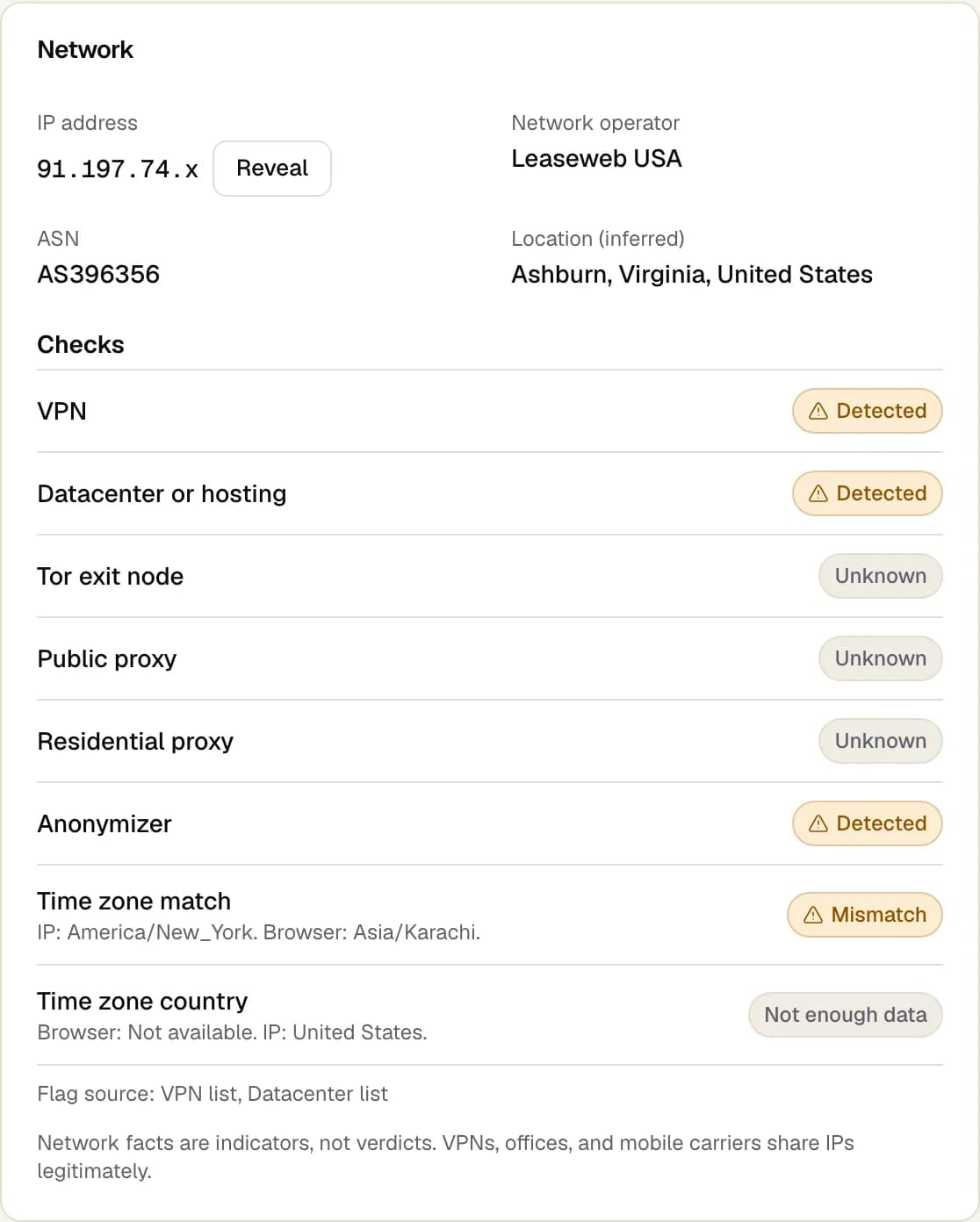
For every visit that carries a gclid, record the IP address and look up who owns it. Free and paid IP intelligence lookups tell you the network operator and its autonomous system number (ASN). Home broadband and mobile carriers are normal. Names of cloud and hosting companies are not where shoppers usually browse from.
3. Compare the browser time zone with the IP location
A small script on the page can read the browser's time zone with the standard Intl.DateTimeFormat().resolvedOptions().timeZone call. Store it next to the visit. If the browser says one continent and the IP address says another, the visitor is probably routing traffic through somewhere else.
4. Group visits by device, not only by IP address
Someone who wants to click your ads repeatedly will change IP address, often by switching VPN server. Grouping visits only by IP address hides that. Compare visits by device characteristics as well, such as screen size, language, platform and browser version. If the same device shows up behind three IP addresses in an hour, that is worth a closer look. Our guide on the same person clicking ads from different devices covers this in more depth.
5. Check what happened after the click
Real visitors read, scroll and click. Automated or paid-for clicks tend to land and leave. Compare engagement for the suspicious group with your normal paid traffic, and with the valuable actions you care about, such as a sign up or a purchase.
VPN, proxy and datacenter traffic are not the same
These three terms get mixed up, and they mean different things for your ads.
| Network type | What it usually is | How much it matters on its own |
|---|---|---|
| Consumer VPN | A paid or free VPN app on a person's device | Low. Common among real people. |
| Datacenter or hosting | A server at a cloud or hosting company | Higher. Few shoppers browse from a server. |
| Public proxy | An open relay anyone can use | Higher. Often used to hide automation. |
| Residential proxy | Traffic sent through other people's home connections | Hard to see, so look for device and behavior patterns. |
| Tor exit node | The last hop of the Tor network | Rare in ad traffic, usually worth a look. |
Datacenter traffic is the clearest signal of the group, because people rarely browse from a hosting provider. Residential proxies are the hardest, because the IP address looks like an ordinary home connection. That is why device and behavior checks matter more than any single IP list.
What to do once you find VPN clicks on Google Ads
Start with the least risky action and work up.
- Watch first. Keep a list of the suspicious visits for a week. Note the campaigns, keywords and hours where they cluster.
- Tighten targeting. If the suspicious clicks come from outside your target countries, check that location targeting uses "presence" rather than "presence or interest", and review your search partner and display placements.
- Exclude specific IP addresses. Google lets you exclude up to 500 IP addresses per campaign, and campaign level IP exclusions are not available for video, hotel, App, Performance Max and Smart Display campaigns. Account level IP exclusions are also supported and apply across campaigns (Google Ads Help: Exclude IP addresses). Exclude addresses you have evidence for, not whole VPN ranges.
- Ask Google to investigate. If you believe you were charged for invalid clicks, you can submit a request through the Click Quality Form for activity in the last 60 days (Google Ads Help: Managing invalid traffic). Our guide to Google Ads invalid click credits explains what to include.
Avoid blocking broad ranges of VPN addresses. VPN providers rotate addresses, a 500 address limit runs out quickly, and you will block real customers along the way.
Where Adjira fits
Doing the steps above by hand works for a few campaigns. It gets slow when you run many campaigns or several ad platforms. Adjira does the same checks on every paid visit.
- Each session runs eight network checks: VPN, datacenter or hosting, Tor exit node, public proxy, residential proxy, anonymizer, time zone match and time zone country. Results read in plain English and are treated as indicators, not verdicts.
- Same person detection links visits that share a device, a browser or a network, and warns when the same device appears from a different country or network operator.
- Every visit gets a fraud risk score with evidence, so you can see which signals raised it.
- For Google Ads click fraud, Adjira estimates suspicious spend per campaign and can propose IP exclusions. Nothing is written to your ad account until a person confirms the change.
Adjira starts in monitor mode. It never blocks traffic on its own.
A short checklist
- Turn on auto-tagging and keep the full landing URL in your logs.
- Add the Invalid clicks column and note which campaigns run high.
- Look up the network operator for paid visits and flag hosting providers.
- Compare browser time zone with IP location.
- Group visits by device as well as IP address.
- Act on patterns, not on single VPN visits.
- Exclude specific addresses with evidence, and file a Click Quality Form request within 60 days when you believe you were charged for invalid clicks.
Frequently asked questions
Are VPN clicks on Google Ads always fraud?
No. Many genuine people use VPNs at work or for privacy. A VPN click deserves attention when it comes with other signals, such as a browser time zone that does not match the IP location, the same device returning from another country, or no real interaction on the page.
Can Google Ads block VPN traffic?
Google Ads has no setting that blocks VPN users. Google filters clicks it judges invalid, and you can exclude specific IP addresses, up to 500 per campaign, or add account level IP exclusions.
Can I exclude VPN IP addresses in Google Ads?
You can exclude individual IP addresses and ranges, but VPN providers rotate addresses and share them between many users. Excluding whole VPN ranges uses up your limit quickly and can block real customers, so exclude addresses you have evidence for.
How do I tell a VPN from datacenter traffic?
Look up the network operator behind the IP address. Consumer VPNs often run on hosting networks too, so the stronger signal is the combination: a hosting network, a time zone mismatch, repeated paid clicks and no engagement on the page.
Why does a click's time zone not match its IP location?
The browser reports the time zone set on the device, while the IP address shows where the traffic exits to the internet. A mismatch usually means the traffic is routed through a VPN or proxy in another place. Travelers can cause it too, which is why it is one signal among several.