Repeat clicks
Same person clicking ads from different devices: how to spot it
How to spot the same person clicking ads from different devices and networks, which signals link visits, how to check your own data and how to review it fairly.
- By
- Adjira team
- Published
- Reading time
- 7 min read
The hardest repeat clicker to catch is the one who knows you are looking. A competitor or a disgruntled former customer who clicks your ads once a day from the same laptop is easy to spot. The same person clicking ads from different devices, switching VPN servers between clicks and moving from home Wi-Fi to mobile data, looks like a stream of new visitors. Every click seems fine on its own. Together they cost you money and tell you nothing true about demand.
This guide explains which signals can link those visits, how to check your own data, and how to review the result fairly, because a match is a lead to investigate, not an identification.
Why the same person clicking ads from different devices looks new
Ad platforms count clicks. Analytics tools count sessions, and most identify a returning visitor with a cookie. All of these break easily:
- A new IP address comes with every VPN server change, every switch between Wi-Fi and mobile data, and every restart of some home routers.
- A new cookie comes with every private browsing window, every cleared browser, and every second browser on the same machine.
- A new device is as simple as picking up a phone instead of a laptop.
Grouping clicks by IP address, which is what IP exclusion lists depend on, misses all of this. Grouping by cookie misses most of it. To see the same person clicking ads from different devices, you need to compare several kinds of evidence at once.
The signals that link visits
No single signal is proof. Each one narrows the field.
Same device
Even when the IP address and cookie change, a device describes itself in much the same way each time: its operating system and version, screen size and pixel density, language settings, time zone, and the hardware details browsers expose. When several of these match closely across visits, the visits probably came from the same device. This is the signal that survives a VPN switch.
Same browser
A closer match than device alone. The same browser build, with the same settings and the same set of supported features, across visits that carry different IP addresses, points to one browser on one machine.
Same network
Visits from different devices that share a home or office connection. This is the weakest link on its own, because families, offices, schools and mobile carriers put many people behind one address. It becomes meaningful when combined with the others, for example a phone and a laptop on the same home network both clicking the same expensive keyword on the same evening.
Same device, different place
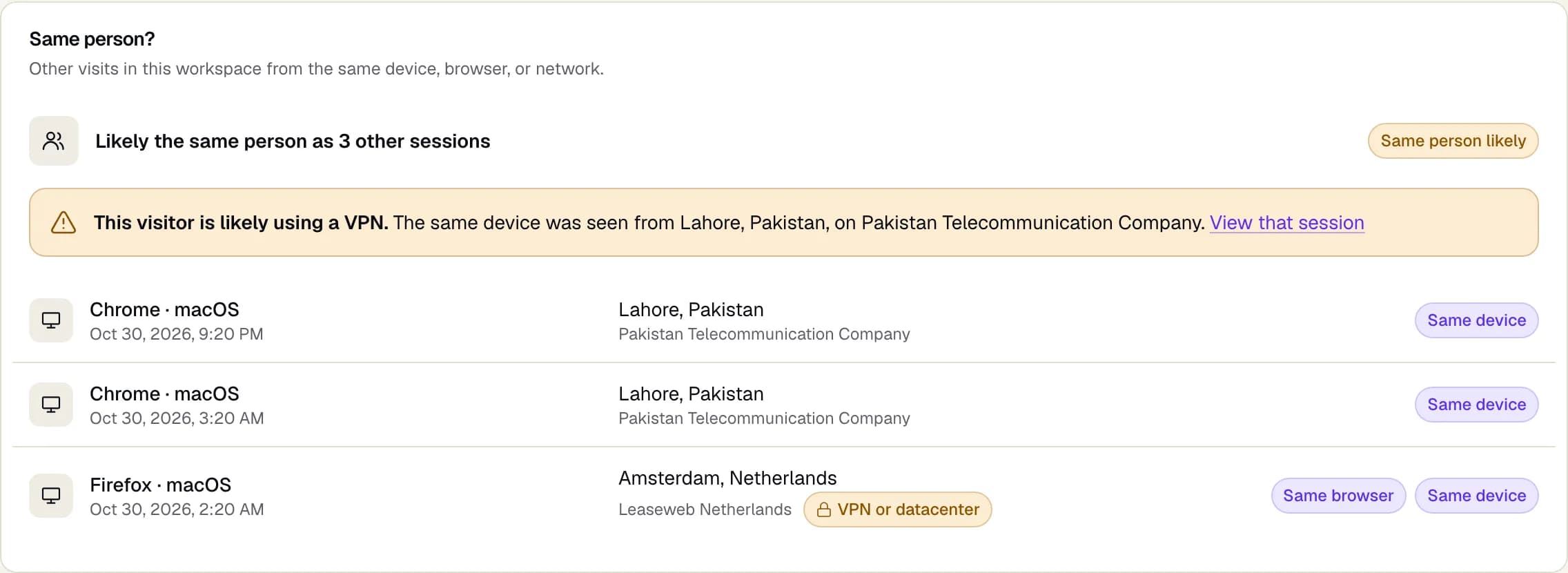
The strongest pattern for repeat clickers who use a VPN: the same device seen through a different country or network operator within a short time. Real people travel, but not between three countries in an afternoon.
Repeat clickers click fraud: how to check your own data
Google already treats manual clicks meant to raise your ad costs as invalid clicks and does not charge for the ones it filters (Google Ads Help: Invalid clicks). The ones it misses are usually the ones spread across devices and networks. You can run a simple version of this check with your own logs.
- Keep the click identifier. Make sure your logs or analytics keep the full landing URL, including the
gclid,fbclid,msclkidorttclidparameter. That ties each visit to a paid click. - Record a few device details. Alongside each paid visit, store screen size, language, browser time zone, operating system and browser version. Check your consent requirements first, and only collect what you need.
- Look up the network. For each paid visit, record the IP address and the network operator that owns it.
- Group by device details, then look at IP addresses. Sort paid visits by the combination of device details. Groups with many paid clicks across several IP addresses or countries are your candidates.
- Check the keywords and timing. A real customer comparing options might click two or three ads over a week. A device that clicks the same high cost keyword a dozen times in two days, from four networks, is a different story.
- Check what they did. Repeat clickers rarely convert. Compare engagement and conversions for the group with your normal paid traffic.
This is slow by hand, and device details alone produce false matches on popular phones, which share the same screen size and operating system. That is why the next step matters.
Same device different IP ad fraud: how to review a match fairly
A likely same person result is a reason to look closer, nothing more. Before you act on one, check:
- Is this a popular device? Thousands of people own the same phone model with the same settings. A match on a common phone with nothing else in common is weak.
- Do the visits share behavior? The same landing page, the same keyword, the same short visit with no interaction.
- Is there a network story? The same device through hosting providers or VPN networks in several countries is stronger than the same device on two mobile carriers.
- Could it be a real customer? People research on a phone and buy on a laptop. Converted visits and long, engaged sessions usually mean a real buyer.
If you decide to act, act on the evidence you have: exclude the specific IP addresses you saw, adjust the keywords or placements that attract the pattern, and keep watching. For Google Ads, IP exclusions are limited to 500 addresses per campaign, and campaign level exclusions are not available for some campaign types, including Performance Max (Google Ads Help: Exclude IP addresses). Device based patterns are often more useful for deciding where to look than for blocking.
Click fraud, VPN, same user: putting it together
A common pattern looks like this. A device clicks a search ad from a home connection in the morning. An hour later the same device clicks the same keyword through a VPN server in another country. In the evening a phone on the same home network clicks a different ad. None of the visits scroll or convert. Separately, these are three unremarkable clicks. Linked, they are one visitor, three paid clicks and no intent to buy.
Our guide on how to detect VPN clicks on Google Ads covers the network side of this pattern in more detail, and same device different IP ad fraud covers one device moving through many networks.
Where Adjira helps
Adjira does this linking on every paid visit, inside your own workspace.
- Same person detection shows same device, same browser and same network matches for each session, and warns that a visitor is likely using a VPN when the same device appears from a different country or network operator.
- Network checks show the network operator and flag VPN, datacenter, proxy and Tor traffic, and compare the browser time zone with the IP location.
- The fraud risk score weighs linked visits alongside over 100 other signals, and each score lists the signals behind it, labeled as detected, inferred or unknown.
- Protection rules can alert your team or propose an exclusion when a pattern repeats. For Google Ads, exclusions are applied only after you grant write access and a person confirms each change; for Microsoft Advertising, Adjira prepares the reviewed list for you to paste.
A likely same person result in Adjira is a lead for review, not an identification of who the person is. Links stay inside your workspace, IP addresses are masked by default, and the tracker can wait for consent; the tracker consent guide explains how.
Frequently asked questions
Can one person look like many visitors in my ad data?
Yes. A new IP address, a new cookie or a new device makes a returning visitor look new to ad platforms and most analytics tools. Switching VPN servers, using private browsing or moving from a laptop to a phone is enough.
How can a tool recognise the same device behind a VPN?
A VPN changes the IP address, but not how the device describes itself. Operating system, screen, language, time zone and browser details stay much the same, so visits that match closely on these can be linked even when the network changes.
Is a shared IP address proof of repeat clicking?
No. Families, offices, schools, public Wi-Fi and mobile carriers put many people behind one IP address. A shared address is a weak signal on its own and needs device, behavior or timing evidence before it means anything.
What does Adjira link visits on?
Adjira links visits in your workspace that share a device, a browser, or a home or office network, and flags when the same device appears from another country or network operator. A match is a lead for review, not an identification of a person.
Is linking visits across devices privacy compliant?
It depends on how you collect and use the data and where your visitors are. Collect only what you need, follow your consent requirements, and keep the data inside your own account. Adjira's tracker can wait for consent and follows the choice your site passes to it.