Skip to content

Click fraud protection for paid ads

Stop paying for clicks that were never customers.

Adjira checks every paid visit to your website for bots, click farms, repeat clickers and VPN or datacenter traffic, shows the evidence behind each flag, and estimates the spend at risk on Google Ads, Meta, Microsoft Advertising and TikTok.

  • Free trial on every plan
  • Read-only ad connections
  • IP addresses encrypted
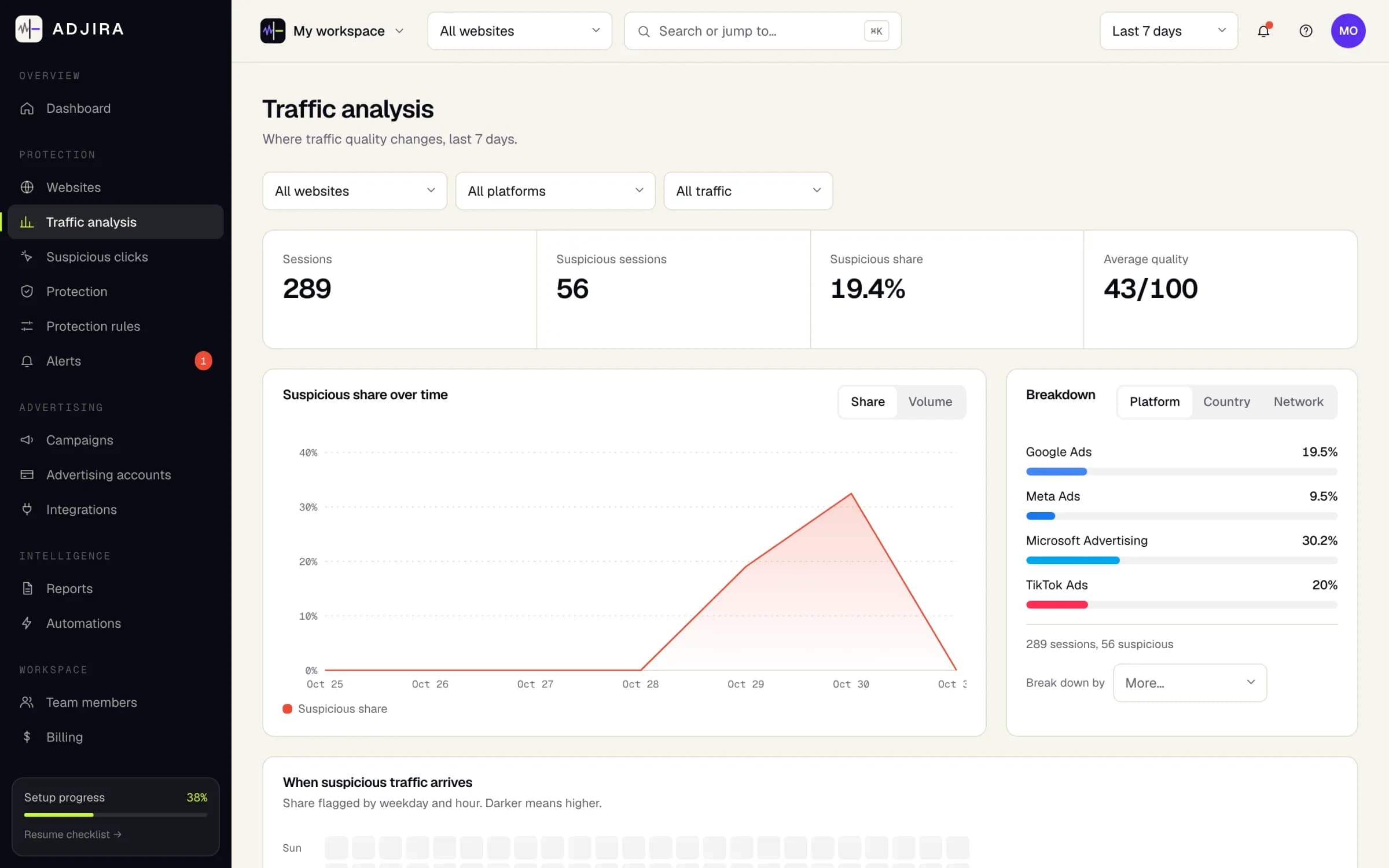
Traffic analysis in Adjira: sessions, suspicious sessions and suspicious share for the last 7 days, a suspicious share chart, and a breakdown by ad platform.
Example dataTraffic analysis, from an example workspace.

Works with the ad platforms you already buy on

The problem

Ad platforms bill for the click, not for the person behind it.

Every platform filters some invalid clicks, using only its own side of the click. What happens on your website after the click, and who the visitor really was, stays invisible to it. That is where wasted spend hides.

  • Bots and automated browsers

    Scripts and headless browsers click ads, load one page and leave. In campaign reports they look like any other click.

  • Click farms and repeat clickers

    The same person or device clicks again and again, sometimes from a phone, a laptop and a VPN, so each click looks new.

  • VPN, proxy and datacenter traffic

    Visits routed through hosting networks or anonymizers hide where they come from, often with a browser time zone that does not match the IP.

How it works

Install, detect, protect.

Setup takes one script tag and a read-only connection to each ad account.

  • Install

    Add your website and paste one script tag, or load it through your tag manager. Connect Google Ads, Meta, Microsoft and TikTok read-only.

  • Detect

    Every paid visit is scored for fraud risk and visitor quality, with the signals behind each score: network, device, behavior and journey.

  • Protect

    Turn patterns into rules, alerts and reviewed exclusion lists, and track the estimated spend at risk per platform and campaign.

Features

Everything you need to find and stop invalid ad traffic.

  • Fraud risk scoring

    A risk score for every paid visit, built from over 100 signals and explained signal by signal.

  • Visitor quality

    A separate quality score shows which real visitors engaged, so low quality is not mistaken for fraud.

  • Same person detection

    Links visits from the same device, browser or network, even when the visitor switches devices or VPNs.

  • VPN and datacenter checks

    VPN, datacenter, Tor, proxy and anonymizer checks, plus browser and IP time zone mismatches.

  • Suspicious spend estimate

    Estimated spend on suspicious clicks per platform and campaign, always labeled as an estimate.

  • Protection rules

    Condition and action rules in plain language, tested against the last 7 days before you switch them on.

  • Alerts and digests

    Email and in-app alerts when traffic quality drops, plus scheduled reports and weekly summaries.

  • Teams and agencies

    Owner, administrator, analyst and viewer roles, and a separate client workspace for every account you manage.

Ad fraud detection

See which paid traffic is real, platform by platform.

The overview and traffic analysis break every paid visit down by platform, campaign, country, device and risk, so a spike of bad traffic stands out before it eats the week’s budget.

  • Fraud risk and visitor quality on every session
  • Filter by platform, campaign and date range
  • Open any visit to see the evidence behind its score
How fraud detection works
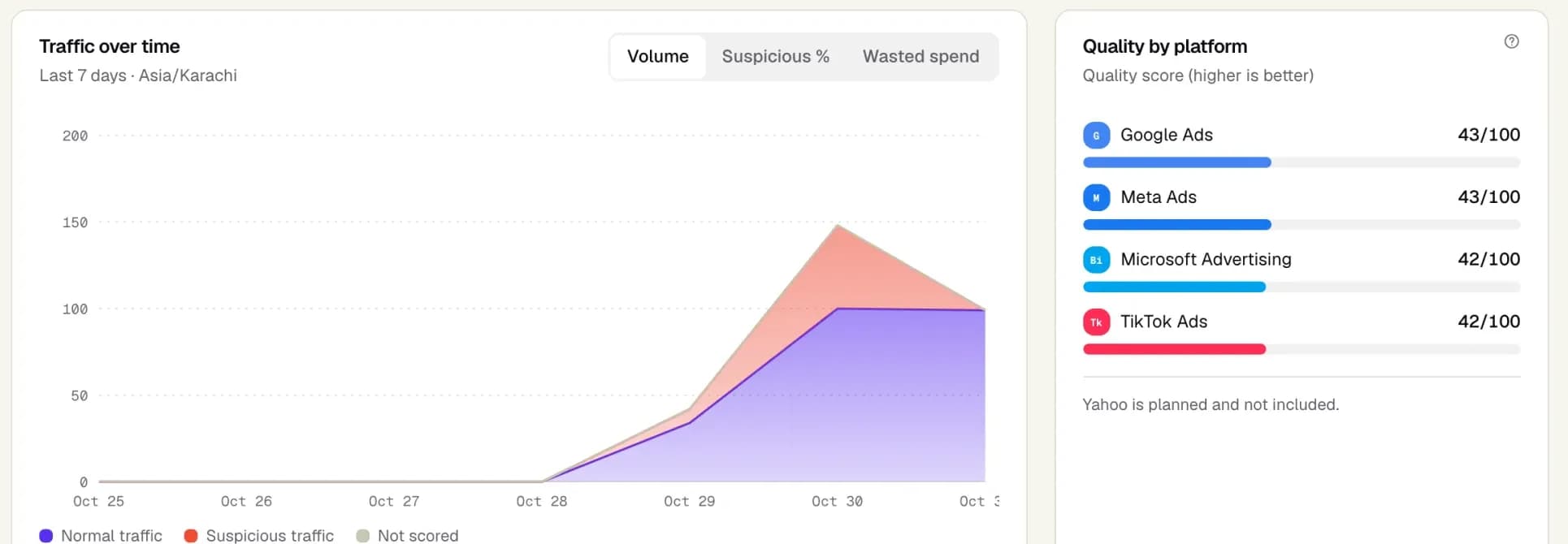
The overview dashboard in Adjira: normal and suspicious traffic over time, and a traffic quality score for Google Ads, Meta Ads, Microsoft Advertising and TikTok Ads.
Example dataScreenshot from an example workspace.

Same person across devices and VPNs

Catch the visitor who keeps coming back as someone new.

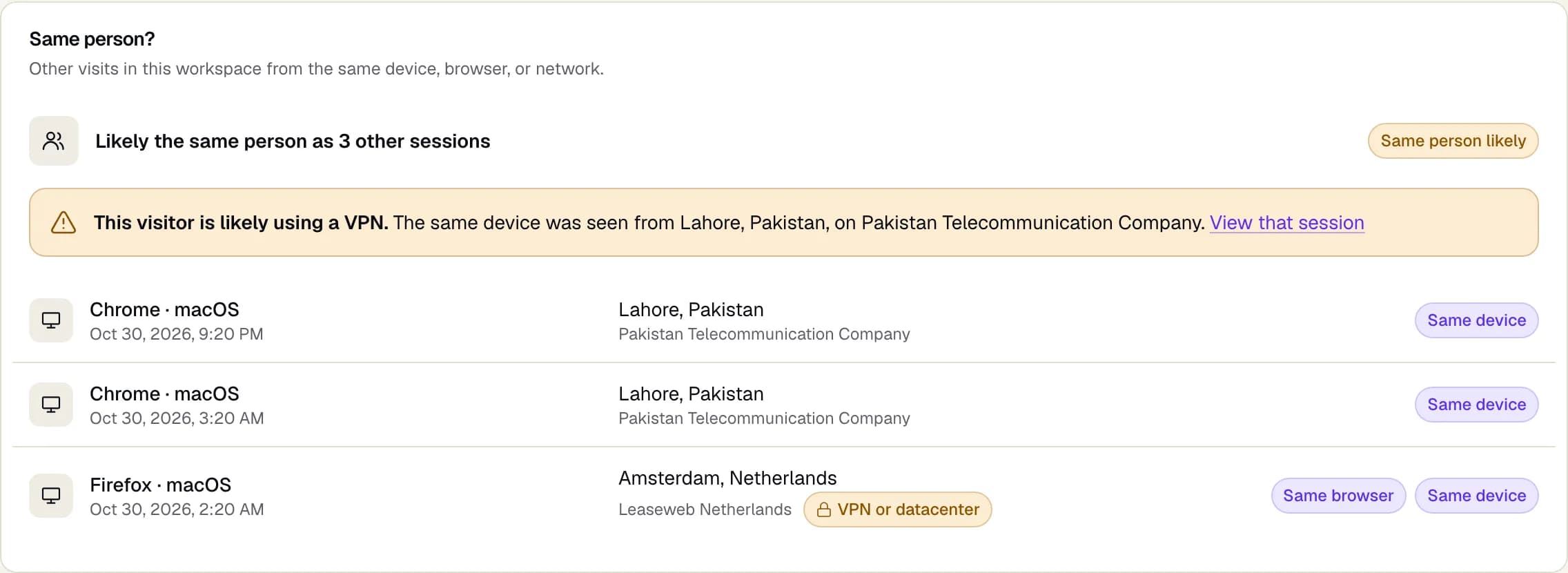
Adjira links visits that share a device, browser or home network, so repeat clickers cannot hide behind a new IP address. When the same device appears from a different country, the session says the visitor is likely using a VPN.

  • Same device, same browser and same network matches
  • VPN warning when one device shows up in two countries
  • Links straight to the other sessions for review
About visitor linking
The Same person? panel on a session: other visits from the same device, browser or network, with a warning that the visitor is likely using a VPN.
Example dataScreenshot from an example workspace.

VPN and datacenter traffic detection

Every visit gets a network check, with reasons in plain English.

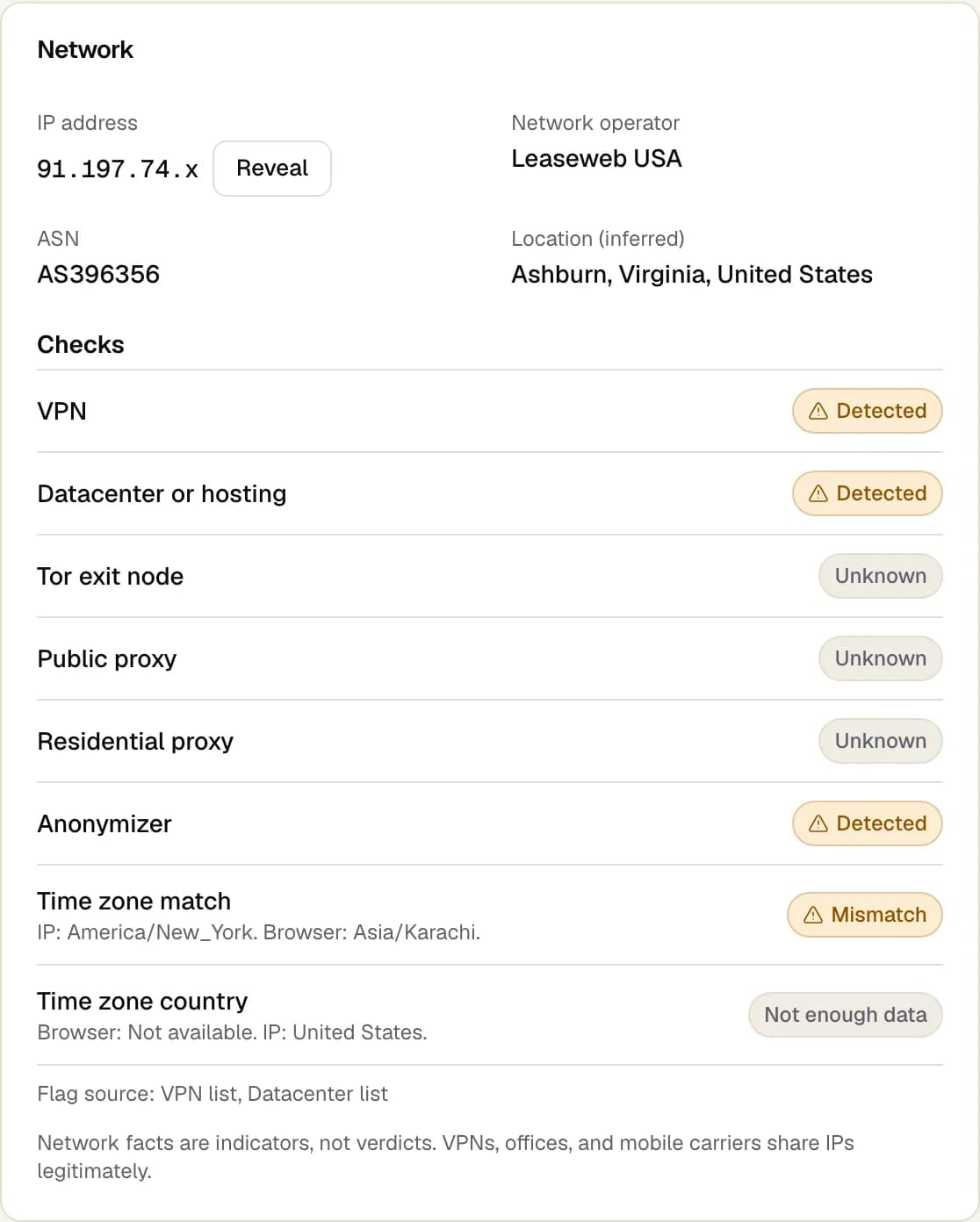
Each session lists its network checks: VPN, datacenter or hosting, Tor exit node, public and residential proxy, anonymizer, and whether the browser time zone matches the IP address. Network facts are shown as indicators, not verdicts.

  • Eight network checks on every visit
  • Time zone and country mismatch between browser and IP
  • IP addresses masked by default, revealed only on request
See every network check
Network checks on a session: the network operator and location, then VPN, datacenter, Tor, proxy, anonymizer and time zone checks.
Example dataScreenshot from an example workspace.

Wasted ad spend

Put a number on the spend that reached no one.

Adjira joins scored sessions with the cost data from each connected ad account, so you can see the estimated spend on suspicious clicks for every platform and campaign, and which campaign to look at first.

  • Estimated suspicious spend per platform and campaign
  • Suspicious share compared with each campaign’s baseline
  • Always labeled as an estimate, never as a saving
How spend is estimated
Wasted ad spendExample data
PlatformSuspicious shareEst. suspicious spend
Google Ads14%$412
Microsoft Advertising22%$188
Meta Ads9%$96
TikTok Ads18%$73

Estimate: suspicious paid clicks multiplied by each account’s cost per click.

Protection rules

Turn what you find into rules your team can trust.

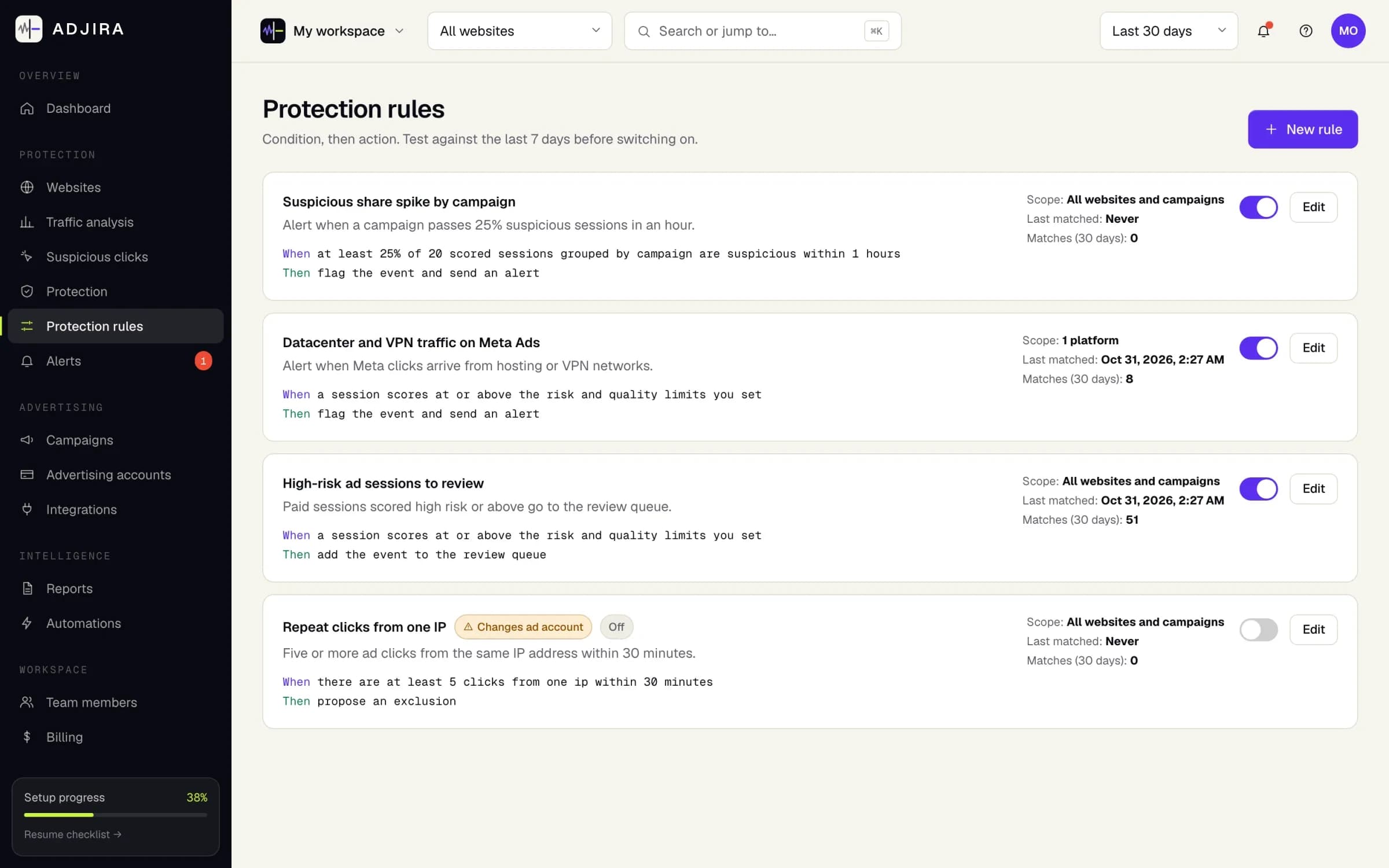
Write a rule as a condition and an action: alert the team, queue a review, or propose an exclusion. Test it against the last 7 days first. Rules that would change an ad account always ask for confirmation.

  • Monitor only, alert and review, or provider actions
  • Reviewed exclusion lists for Google Ads and Microsoft Advertising
  • Nothing is written to an ad account without a person confirming it
How protection rules work
Protection rules in Adjira, each written as a condition and an action, some switched on and one switched off.
Example dataScreenshot from an example workspace.

Reports and alerts

Know the moment traffic quality drops.

Alerts reach the right people by email and in the app when suspicious traffic spikes or a tracker stops sending events. Scheduled reports and weekly digests keep stakeholders informed without another login.

  • Email and in-app alerts per website
  • Scheduled reports and weekly digests
  • Export sessions, events, scores and clusters as CSV or JSON
About reports and alerts
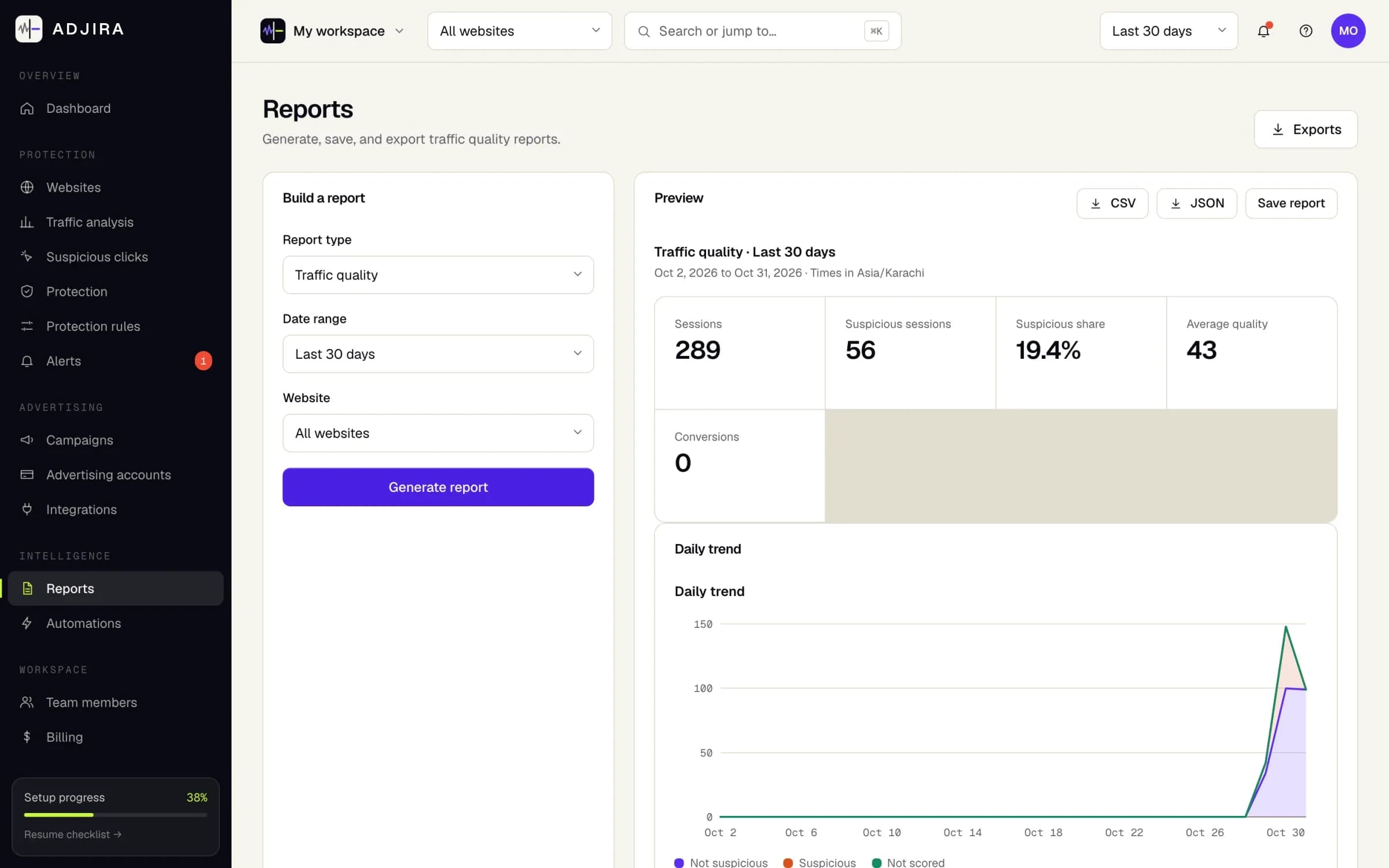
The Reports page in Adjira: a traffic quality report for the last 30 days with CSV and JSON export and a daily trend chart.
Example dataScreenshot from an example workspace.

By the numbers

Built to look at every paid visit, not a sample.

signals checked on every paid visit
100+
signal families, from network to journey
9
ad platforms in one view
4
network checks on every visit
8

Facts about the product itself. We do not publish customer counts or savings claims.

Security and privacy

Privacy first by design.

Ad traffic data includes IP addresses and device details, so it is handled with care from the first event.

  • Data processing agreement

    Every customer is covered by a data processing agreement, and every vendor is listed.

  • IP addresses protected

    Encrypted at rest and shown masked by default.

  • Read-only by default

    Ad accounts connect read-only. Write access is separate, optional and revocable.

  • GDPR ready

    A data processing agreement, a public subprocessor list and a tracker consent guide.

FAQ

Questions about click fraud protection.

Plans that scale with your ad spend.

Start with a free trial, then choose a plan by websites, monitored clicks and team size.

What counts as click fraud or invalid traffic?

Any paid click that is unlikely to come from a person with real interest: bots and automated browsers, click farms, competitors or the same visitor clicking again and again, and traffic routed through datacenters, VPNs or proxies to hide where it comes from. Adjira checks over 100 signals on every paid visit and labels each finding as detected, inferred or unknown. A risk score is evidence to review, not proof of fraud.

How is Adjira different from the filtering my ad platform already does?

Google, Meta, Microsoft and TikTok each filter some invalid clicks, but only with their own view of the click. Adjira adds the view from your website: what the visitor did after landing, which device and network they used, whether the same person came back through another device or VPN, and how that compares across all four platforms in one place.

Which ad platforms does Adjira support?

Google Ads, Meta Ads (Facebook and Instagram), Microsoft Advertising and TikTok Ads. Connections are read-only by default. Exclusion lists can be pushed back to the platforms whose APIs support them, after you grant write access and confirm each change. See every integration

Does Adjira block traffic automatically?

No. Adjira starts in monitor mode and never changes an ad account on its own. Protection rules can alert your team, queue a session for review, or propose an exclusion, and every exclusion is confirmed by a person before it is written to the ad platform.

How is wasted ad spend calculated?

Adjira multiplies the paid visits it scores as suspicious by the cost per click reported by each connected ad account, per campaign and per platform. It is labeled as an estimate everywhere it appears: it is not a verified saving, and it is not a refund from the ad platform.

What does the tracker collect, and is it GDPR friendly?

A small script records page views and paid click landings: time, landing page, ad click identifiers, and coarse device and network details. IP addresses are encrypted at rest and shown masked by default. The tracker can wait for consent and follows the choice your site passes to it, with a guide for Google Consent Mode and Global Privacy Control. Customers are covered by a data processing agreement. Read the tracker consent guide

How long does setup take, and is there a free trial?

Add your website, paste one script tag or load it through your tag manager, and connect your ad accounts read-only. Sessions appear as soon as paid traffic lands. Every plan starts with a free trial; the pricing page shows the trial length and plan limits. Compare plans

Make every ad dollar count.

Install in minutes, connect your ad accounts read-only, and see your first scored sessions as soon as paid traffic lands.