Skip to content

Solutions · Agencies

Click fraud protection for every client you manage.

Run a separate workspace per client, give analysts and viewers the right access, and send scheduled reports that explain traffic quality and suspicious spend in plain language.

What you get

  • A client workspace per account, switchable from one login
  • Owner, administrator, analyst and viewer roles
  • Scheduled reports and weekly digests by email
  • Evidence you can show a client, session by session

The features that matter most here

Teams and agency client workspaces

Why it matters: Every client needs separate access, data and reporting.

Invite your team with owner, administrator, analyst and viewer roles. Agencies can add a separate client workspace for every account they manage, each with its own websites, connections and reports.

  • Four roles with clear permissions
  • A workspace per client, switchable from one login
  • Two-step sign in with an authenticator app
Adjira for agencies
Teams and agency client workspacesExample data
  • NO

    Northwind Outdoor

    3 websites · Google Ads, Meta

    Owner
  • HD

    Harbor Dental Group

    1 website · Microsoft Advertising

    Analyst
  • LF

    Lumen Fitness

    2 websites · Meta, TikTok

    Administrator
  • OF

    Oakline Furniture

    1 website · Google Ads
    Viewer

Alerts, reports and digests

Why it matters: Bad traffic is cheapest to stop on the day it starts.

Alerts arrive by email and in the app when suspicious spend spikes, a campaign passes its suspicious traffic threshold, a cluster of high risk traffic appears, or tracking stops on a website. Scheduled reports and weekly digests keep stakeholders informed.

  • Choose how you hear about each kind of alert
  • Scheduled reports and weekly email digests
  • Export sessions, events, scores and clusters as CSV or JSON
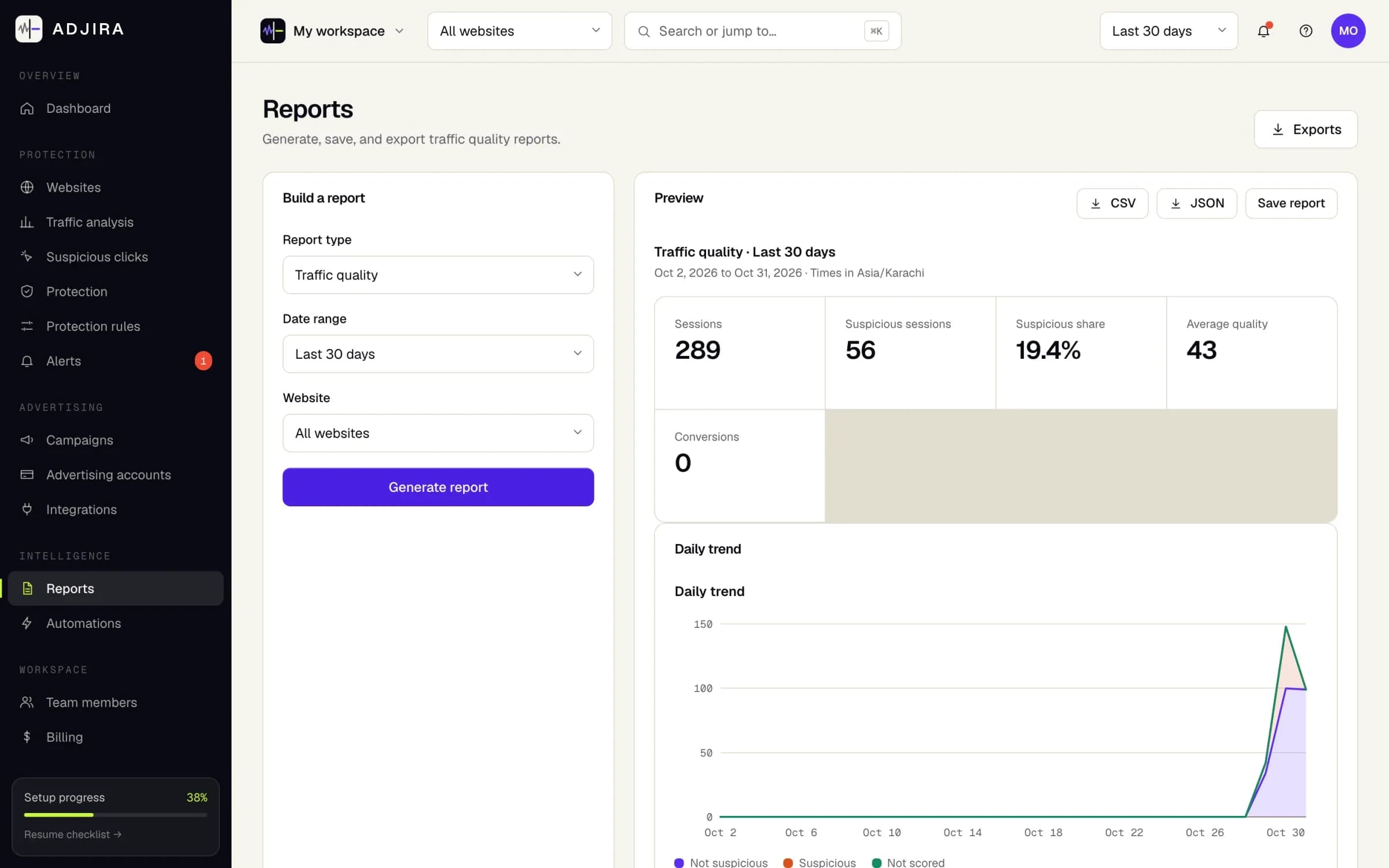
The Reports page in Adjira: a traffic quality report for the last 30 days with CSV and JSON export and a daily trend chart.
Example dataScreenshot from an example workspace.

Fraud risk scoring with evidence

Why it matters: A flag you cannot explain is a flag you cannot act on.

Every paid visit gets a fraud risk score built from over 100 signals in nine families: network, browser, automation, behavior, journey, visit history, ad click data, website baselines and clusters. Each score lists the signals behind it, labeled as detected, inferred or unknown.

  • Risk bands from normal to very high on every session
  • Correlated suspicious visits grouped into clusters
  • Mark sessions reviewed, add notes and export the evidence
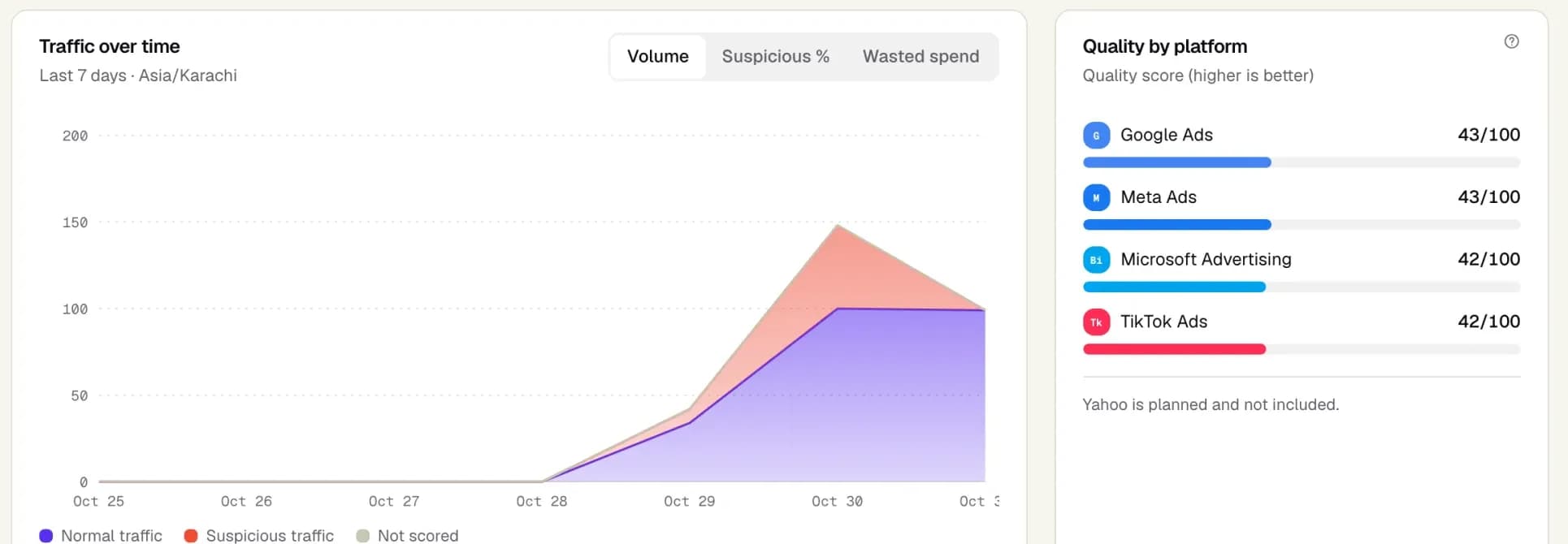
The overview dashboard in Adjira: normal and suspicious traffic over time, and a traffic quality score for Google Ads, Meta Ads, Microsoft Advertising and TikTok Ads.
Example dataScreenshot from an example workspace.

Questions

Can I manage several clients from one login?

Yes. Each client gets its own workspace with its own websites, ad connections and reports, and you switch between them from one login.

Can I control what my team sees for each client?

Yes. Owner, administrator, analyst and viewer roles control who can change rules, billing and integrations in each workspace.

How do I show clients what Adjira found?

Scheduled reports and weekly email digests summarize traffic quality and estimated suspicious spend, and every finding links to the sessions behind it, so you can show the evidence session by session.

Make every ad dollar count.

Install in minutes, connect your ad accounts read-only, and see your first scored sessions as soon as paid traffic lands.