Microsoft Advertising
Microsoft Advertising click fraud: how to check your Bing ads traffic
Microsoft Advertising click fraud: how invalid clicks are handled, how to ask for a credit, what partner and audience traffic adds, and how to check it.
- By
- Adjira team
- Published
- Reading time
- 5 min read
Microsoft Advertising click fraud gets less attention than Google Ads click fraud, mostly because budgets on Bing are smaller. The questions are the same, though: which clicks were invalid, did you pay for them, and what can you do about the ones that got through. The answers depend partly on where your ads run, because Microsoft Advertising can show them on Bing and other Microsoft sites, on syndicated search partners and on Microsoft Audience Network.
This guide covers what to check with Microsoft first, how partner and audience traffic changes the picture, and how to check your own Bing ads traffic for click fraud.
How Microsoft handles invalid clicks
Microsoft Advertising describes its click quality and credit processes in its own help center, including an article on credits, refunds and adjustments and one on monitoring clicks. We could not load those pages reliably while writing this guide, so we do not quote them here. Read them directly for the current wording on how clicks are classified, when you are billed, and how credits are issued.
What is consistent across the industry is the framework. The Media Rating Council, which accredits ad measurement, publishes Invalid Traffic Detection and Filtration Guidelines that separate general invalid traffic, caught by routine list based filtering, from sophisticated invalid traffic, which is designed to look human and needs more analysis. Large ad platforms filter invalid clicks before billing and credit some invalid activity they find later. Google, for comparison, documents that it does not charge for invalid clicks it filters and issues credits for invalid activity found after billing (Google Ads Help: Invalid clicks).
How to request a credit for Bing ads click fraud
If you believe you were charged for invalid clicks on Microsoft Advertising, contact Microsoft Advertising support from your account and ask for an investigation. Check Microsoft's current help pages for the exact process and any time limits before you file.
Prepare the same evidence you would for any platform:
- The dates, campaigns, ad groups and keywords affected.
- The change you saw: a rise in clicks or cost with no rise in engaged visits or conversions.
- Visit level detail for the suspicious clicks: the
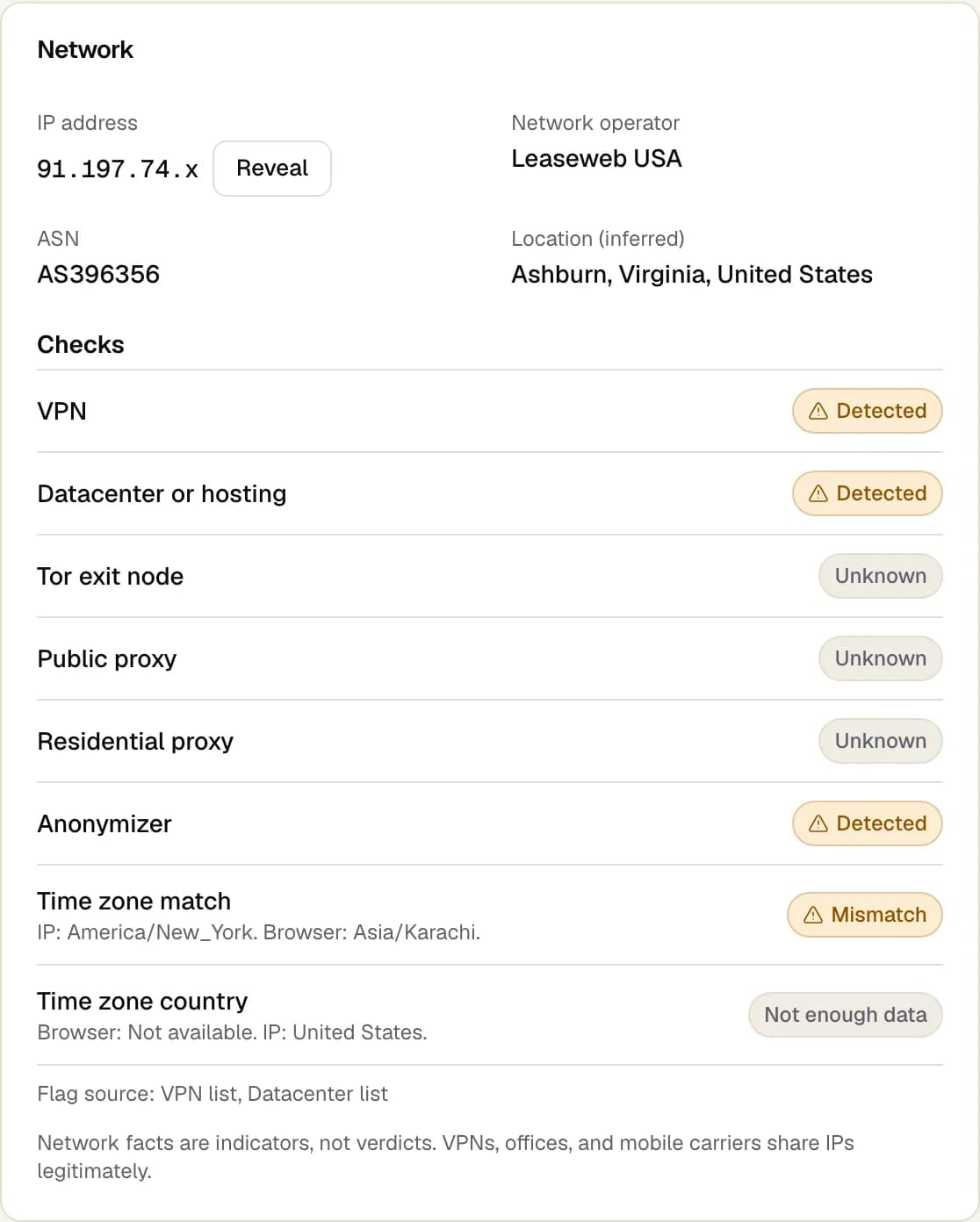
msclkidvalue from each landing URL, the time, the IP address and the network operator behind it. - Patterns: repeat clicks from the same device or address, clicks from hosting providers, time zones that do not match the IP location, and visits with no interaction.
- What you already changed, such as exclusions you added.
Our guide to the Google Ads invalid activity credit report explains how to present this kind of evidence, and the same structure works for a Microsoft request.
Where Microsoft Advertising click fraud tends to come from
Bing and other Microsoft sites
Search ads on Microsoft's own search results are the core of most accounts. Invalid clicks happen here as on any search engine, including repeat clicks on expensive keywords.
Syndicated search partners
Microsoft Advertising can also show search ads on partner sites that use its search results. Partner traffic varies from site to site. Your campaign's network settings control whether ads run only on Microsoft owned sites or on partners too, and you can exclude specific websites that send poor traffic.
Microsoft Audience Network
Microsoft Audience Network shows native and display style ads on Microsoft properties and partner sites. As with any audience network, placement quality varies, and clicks can be accidental or cheap for reasons unrelated to interest. Treat it as a separate source and judge it on its own results.
How to check Microsoft Advertising traffic yourself
1. Turn on auto-tagging
Make sure Microsoft Advertising adds the msclkid click identifier to your landing URLs, and that your logs or analytics keep the full URL. Add UTM parameters that include the network, so search, partner and audience traffic can be separated.
2. Compare networks
In your reports, segment results by network or by the websites where ads appeared. Compare click-through rate, cost, engaged sessions and conversions for Microsoft sites, search partners and audience placements. A source with many clicks and few engaged visits is the first to examine.
3. Check the visits
On your site, look at paid visits carrying msclkid:
- Who owns the network behind the IP address? Hosting providers deserve a closer look.
- Does the browser time zone match the IP location?
- Does the browser show automation signs?
- Did the visitor scroll, click or convert?
- Does the same device appear again and again from different IP addresses? See same device different IP ad fraud.
4. Look at timing and keywords
Repeat clickers often focus on a few costly keywords and click in bursts. Sort suspicious visits by keyword and hour and look for clusters.
What to do about Bing ads click fraud
- Exclude specific IP addresses with evidence. Microsoft Advertising supports IP exclusions in campaign settings. Check its help pages for current limits.
- Exclude poor websites. If particular partner or audience sites send the suspicious clicks, add them to your website exclusions.
- Adjust network settings. If partner traffic performs clearly worse on your site, test a campaign limited to Microsoft owned sites.
- Tighten keywords and schedules. If repeat clicks cluster on a few keywords or hours, change bids, match types or the ad schedule for those.
- Request an investigation with your evidence, as above.
Where Adjira helps
Adjira connects to Microsoft Advertising read-only and attributes each paid visit to its campaign from the click identifier. Every session gets a fraud risk score with evidence, network checks and same person detection across devices and networks. Suspicious spend is estimated per campaign from your cost reports and always labeled as an estimate.
For Microsoft Advertising, Adjira prepares the exclusion list for you rather than writing it to your account: it proposes IP addresses from its findings and protection rules, formatted for Microsoft's campaign level IP exclusions (up to 100 per campaign, IPv4, with the last part as a wildcard where useful), and you paste the reviewed list into Microsoft Advertising. See the Microsoft Advertising integration for what the connection reads.
If you are comparing tools for this, our guide on how to choose a click fraud tool lists the questions worth asking, including which platforms each tool covers.
Frequently asked questions
Is there click fraud on Microsoft Advertising?
Invalid clicks exist on every large ad platform, including Microsoft Advertising. Microsoft filters and credits invalid clicks under its own processes, described in its help center. Checking the visits on your own website shows what gets through.
How do I get a refund for invalid clicks on Bing ads?
Contact Microsoft Advertising support from your account and request an investigation, with dates, campaigns, keywords and visit level evidence. Check Microsoft's current help pages on credits and refunds for the exact process and time limits.
Are Bing search partners more prone to click fraud?
Partner traffic varies by site. Segment your results by network and by website, compare engaged visits and conversions on your own site, and exclude the websites or the partner network if they perform clearly worse.
Can I exclude IP addresses in Microsoft Advertising?
Yes. Microsoft Advertising supports IP exclusions in campaign settings, and website exclusions for partner and audience placements. Check the help center for current limits.
Can Adjira push exclusions to Microsoft Advertising?
Yes, after you grant write access. Adjira proposes exclusion list additions from its findings and protection rules, and each change is applied only after a person confirms it.