Meta Ads
Meta ads bot traffic: how to check your Facebook and Instagram clicks
How to check for Meta ads bot traffic on Facebook and Instagram: compare link clicks with landing page views, break down placements, review visits on your site.
- By
- Adjira team
- Published
- Reading time
- 7 min read
Meta ads bot traffic usually shows up as a feeling before it shows up as proof. Clicks look healthy in Ads Manager, but your analytics shows far fewer visitors, the visitors who do arrive leave at once, and the leads that come in have fake names and unreachable phone numbers. Some of that gap is normal. Some of it is not.
This guide walks through what you can check inside Meta Ads Manager, what you can only see on your own website, and how to tell slow pages and curious scrollers apart from automated clicks.
Not every gap is bot traffic
Before looking for bots, rule out the ordinary causes. People tap ads by accident while scrolling. Mobile pages load slowly on weak connections, and some people give up before the page appears. In-app browsers on Facebook and Instagram sometimes block or delay analytics scripts. Ad blockers and consent choices stop analytics from recording some visits at all.
Meta built a metric for exactly this. When it introduced landing page views, it described the metric as counting "the number of visitors that arrive to your website after a link click on an ad", and pointed to slow mobile sites and poor connections as a reason many people lose interest before the page loads (Meta: New ways to better understand interactions).
So a difference between link clicks and landing page views is expected, and our guide to Facebook ads clicks vs landing page views shows how to benchmark it in your own account. What you are looking for is a difference that is much larger on one campaign, ad set or placement than on the others.
How to check bot traffic on Facebook ads in Ads Manager
These checks use only Ads Manager. They will not prove bot traffic, but they show you where to look.
1. Compare link clicks with landing page views
Add both Link clicks and Landing page views to your columns. Landing page views need the Meta pixel or the Conversions API to be set up on your site. Then compare the ratio across campaigns and ad sets. A campaign where only a small share of link clicks turns into landing page views, while your other campaigns do much better with the same landing page, is the first place to look.
2. Break results down by placement
Use the Breakdown menu and choose placement. Compare Facebook Feed, Instagram Feed, Stories, Reels and Audience Network side by side. Look at click-through rate, the link click to landing page view ratio and cost per result. A placement with a very high click-through rate and very few landing page views deserves attention.
3. Break results down by time and region
Break down by region and by time of day. Clicks that arrive in bursts in the middle of the night for your target market, or from regions outside your targeting, are worth noting. Check which location option each ad set uses, and that it matches the people you actually want to reach.
4. Look at the lead quality, not only the lead count
For lead forms, export a week of leads and read them. Repeated names, invalid phone numbers, disposable email domains and leads submitted seconds after the ad was served are signs of low quality or automated submissions.
Facebook ads clicks vs landing page views: what to check on your site
Ads Manager only sees the click. Your website sees the visit. To separate real visitors from Meta ads bot traffic, you need both.
Meta adds an fbclid parameter to the landing URL. Keep the full landing URL in your server logs or analytics, and add UTM parameters to every ad so each visit can be traced to a campaign, ad set and ad. Then check:
- Network. Look up who owns the IP address of each paid visit. People browse from home broadband, office networks and mobile carriers, not from cloud servers. A run of paid visits from a hosting provider is a strong signal.
- Browser details. Automated browsers often give themselves away. Some report automation control, some have a screen size or language that does not fit the device they claim to be.
- Time zone. A browser time zone that does not match the IP location suggests a VPN or proxy.
- Behavior. Real visitors scroll, read and tap. Bots tend to land, sit still and leave, or move through the page in perfectly regular steps.
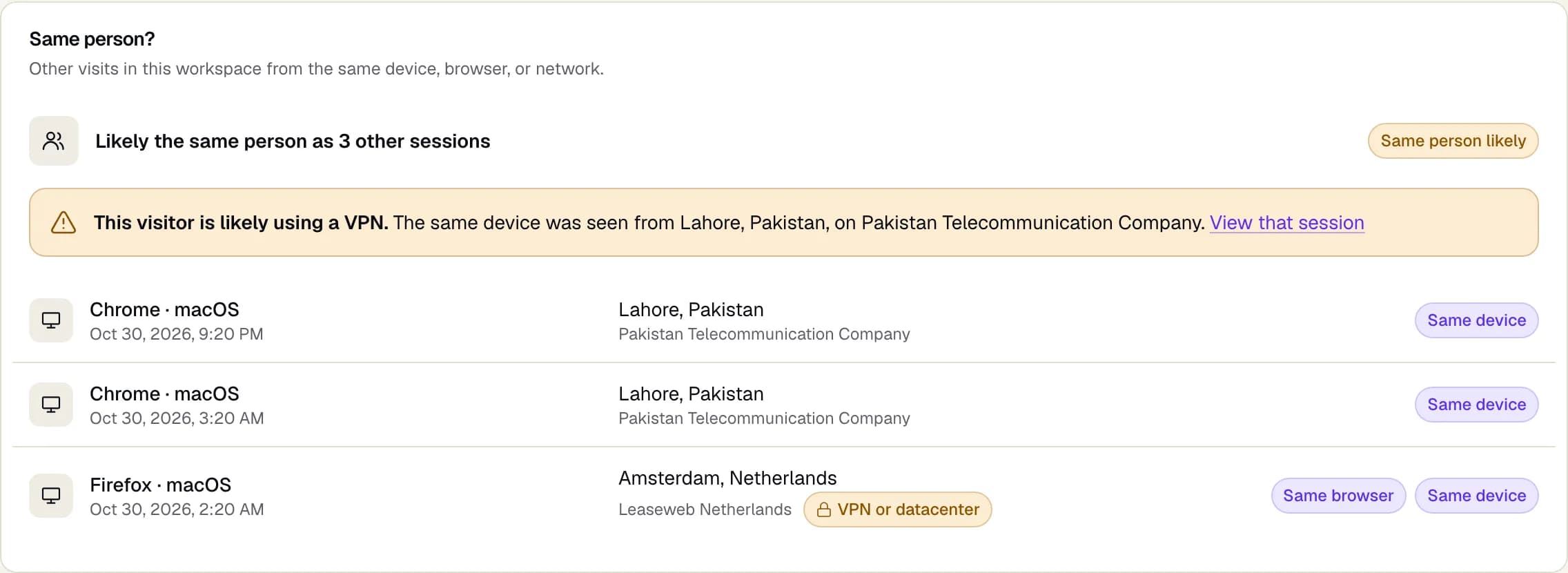
- Repeat visits. The same device returning again and again from different IP addresses is a pattern worth reviewing. See our guide on the same person clicking ads from different devices.
Is Audience Network bot traffic a real concern?
Audience Network shows your ads in other apps and sites outside Facebook and Instagram. It can reach people cheaply, but the quality varies from app to app and you see less of the context your ad appeared in. If your placement breakdown shows Audience Network with a high click-through rate and few landing page views or conversions, test a version of the ad set without it. You can choose placements manually in the ad set, and Meta offers block lists for publishers you do not want to appear on.
The same advice holds for any placement: judge it by what visitors do on your site, not by its click-through rate. Our guide to Advantage+ bot traffic covers placement controls in more detail.
What the industry means by invalid traffic
It helps to use the same words as the people who measure this. The Media Rating Council, which sets measurement standards in the advertising industry, publishes the Invalid Traffic Detection and Filtration Guidelines. They split invalid traffic into general invalid traffic, which routine filtering with lists and simple checks can catch, such as known data center traffic and declared crawlers, and sophisticated invalid traffic, which takes more analysis to find because it is designed to look human.
Ad platforms filter the general kind well. The sophisticated kind is where seeing the visit on your own site helps most.
What to do once you find Meta ads bot traffic
- Narrow the cause. Find the campaign, ad set and placement where the gap or the suspicious visits cluster.
- Change placements. Test the ad set without the placement that brings the worst visits, and use block lists for Audience Network publishers you do not want.
- Tighten lead forms. Use the higher intent form type that asks people to review their details, and add a question a bot is unlikely to answer well.
- Optimize for the right event. Optimizing for link clicks rewards cheap clicks. Optimizing for landing page views or a conversion event pushes delivery toward people who actually arrive and act.
- Keep the evidence. Note dates, campaigns and sample visits, so you can compare after each change.
Where Adjira helps with Meta ads
Adjira connects to Meta Ads read-only and attributes each visit on your site to its campaign. For each paid visit it builds a fraud risk score with evidence from over 100 signals, runs network checks for VPN, datacenter and proxy traffic, and links repeat visits from the same device. It keeps a separate visitor quality score, so a weak campaign is not mistaken for an attack.
On the Meta Ads page you can see what the connection reads. Meta's API does not support the exclusion lists Adjira can push to Google Ads and Microsoft Advertising, so for Meta you act on the evidence in Ads Manager yourself: change placements, adjust targeting, or pause an ad set.
If you also run TikTok, the same checks apply there. Our guide to TikTok ads click fraud covers the differences.
Frequently asked questions
How do I know if my Facebook ad clicks are bots?
Compare link clicks with landing page views across campaigns and placements, then look at the visits on your own site. Hosting provider networks, automated browser signs, a time zone that does not match the IP location and no interaction on the page are the clearest signals. One signal is a lead, several together are a pattern.
Why do Meta link clicks not match landing page visits?
Link clicks count taps on the ad, while landing page views count people whose page actually loaded. Slow pages, weak mobile connections, in-app browsers, ad blockers and consent choices all widen the gap. A gap that is much larger on one placement or campaign than on the others is worth investigating.
Does Adjira block bots on Meta?
No. Adjira scores each visit, estimates suspicious spend and shows the evidence. It does not write exclusions to Meta, so you act on what you find in Ads Manager, for example by changing placements or pausing an ad set.
Is Audience Network traffic lower quality?
It varies by app and site. Judge it by what visitors do after the click. If Audience Network brings many clicks but few landing page views or conversions, test the ad set without it or use a block list.
Can I get money back from Meta for bot clicks?
We could not find a current Meta help article that describes an advertiser credit process for invalid clicks, so we do not describe one here. Contact Meta support through Ads Manager with your evidence if you believe you were charged for invalid activity.